Opal knew my screen time (but showed it after the paywall)
7 min read · about Opal ·
Opal knew my screen time (but showed it after the paywall)
A beautiful story and great permission screens. Then a paywall with a stranger’s 6h 32m. My real 3h 12m came after I started the trial.
1 / 27

Written by
Eddy Bogomolov
Product designer for free trials
Published
What you'll learn
- Put your most convincing screen before the paywall, not after it. Opal had my real screen time a minute before the paywall. The paywall showed a stranger’s 6h 32m. My own 3h 12m showed up on the home screen, after I started the trial.
- If your app can measure it, don’t ask people to guess. Opal asked me to guess my screen time, built “13 years of your life” on my guess, and only then asked for the access that shows the real number.
- The first rule should block what the app already knows. Opal’s home screen named YouTube and Instagram as my culprits. The rule it set up for me blocked Notion, my work app, during work hours.
Opal had my real screen time a minute before its paywall. The paywall showed a stranger’s numbers instead. Mine showed up after I started the trial.
Opal knew my screen time (but showed it after the paywall), chapter by chapter
In this story, I run a one-person product design consultancy. My phone eats more of my day than I'd like.
I want to be more present. An app that blocks my distractions sounds right.
So I tested Opal, a screen time app that blocks the apps you lose your day to. I recorded the journey from the App Store to my first rule.
The onboarding is the most beautiful I've recorded. The permission screens and the trial reminder are the best I've seen.
But here's what happened with the one number that matters.
Opal got my real screen time a minute before its paywall.
The paywall showed me a stranger's: 6h 32m.
My own, 3h 12m, showed up on the home screen. After I started the trial.
The most convincing screen in the app came after the decision.
Let's get into it.
1. The story sells the app in fifteen seconds
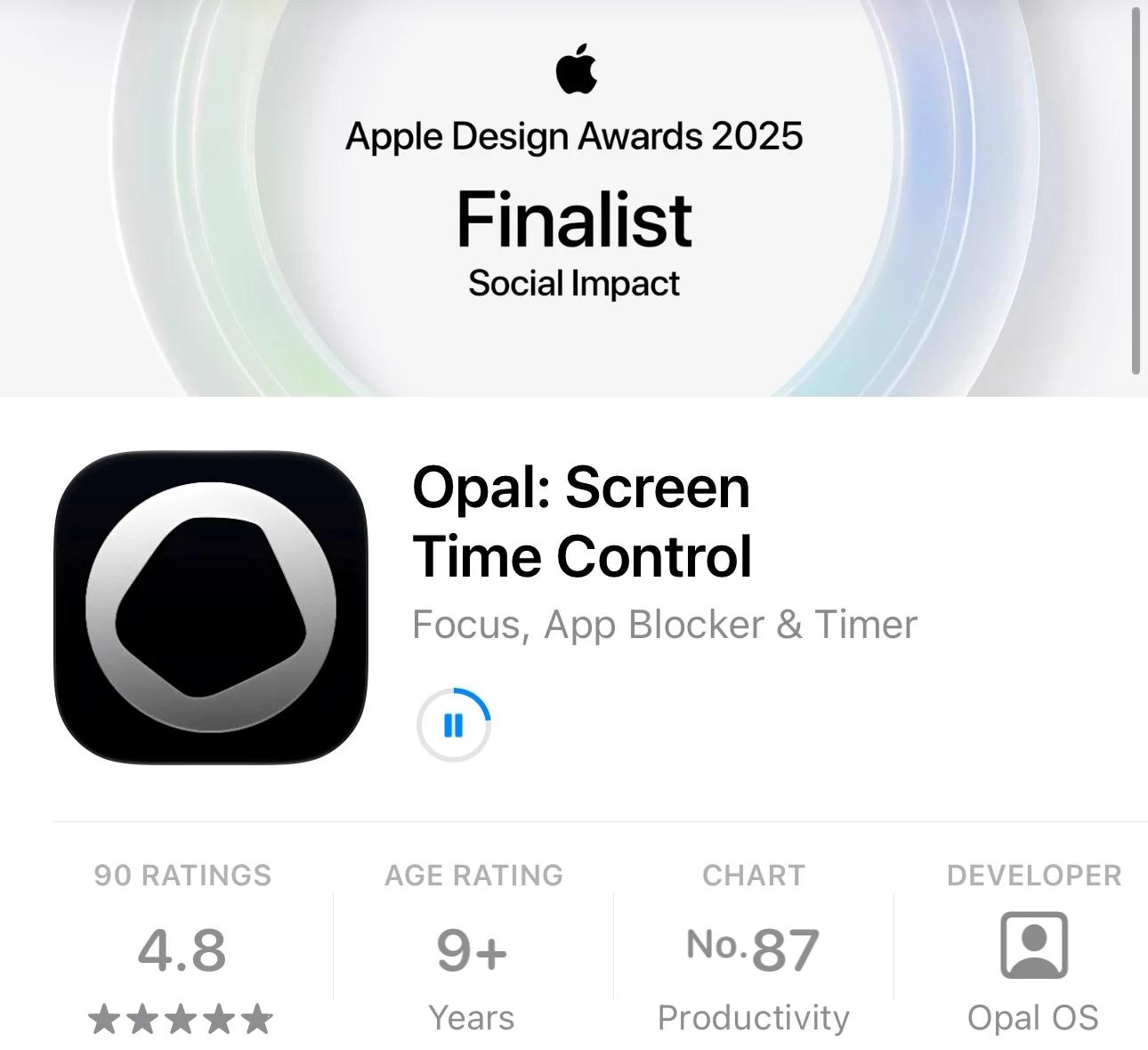
First, the App Store. And this is huge: Opal is a finalist for Apple's Design Awards. I'm a big Apple fan, so I'm half sold before I even open it. 4.8 stars, too. And a promise:
"Get back 1h23m every day."
An Apple award and an hour of my day back? I tap Get.
But first, a tracking prompt
I open Opal. The very first thing I see:
"Allow 'Opal' to track your activity across other companies' apps and websites?"
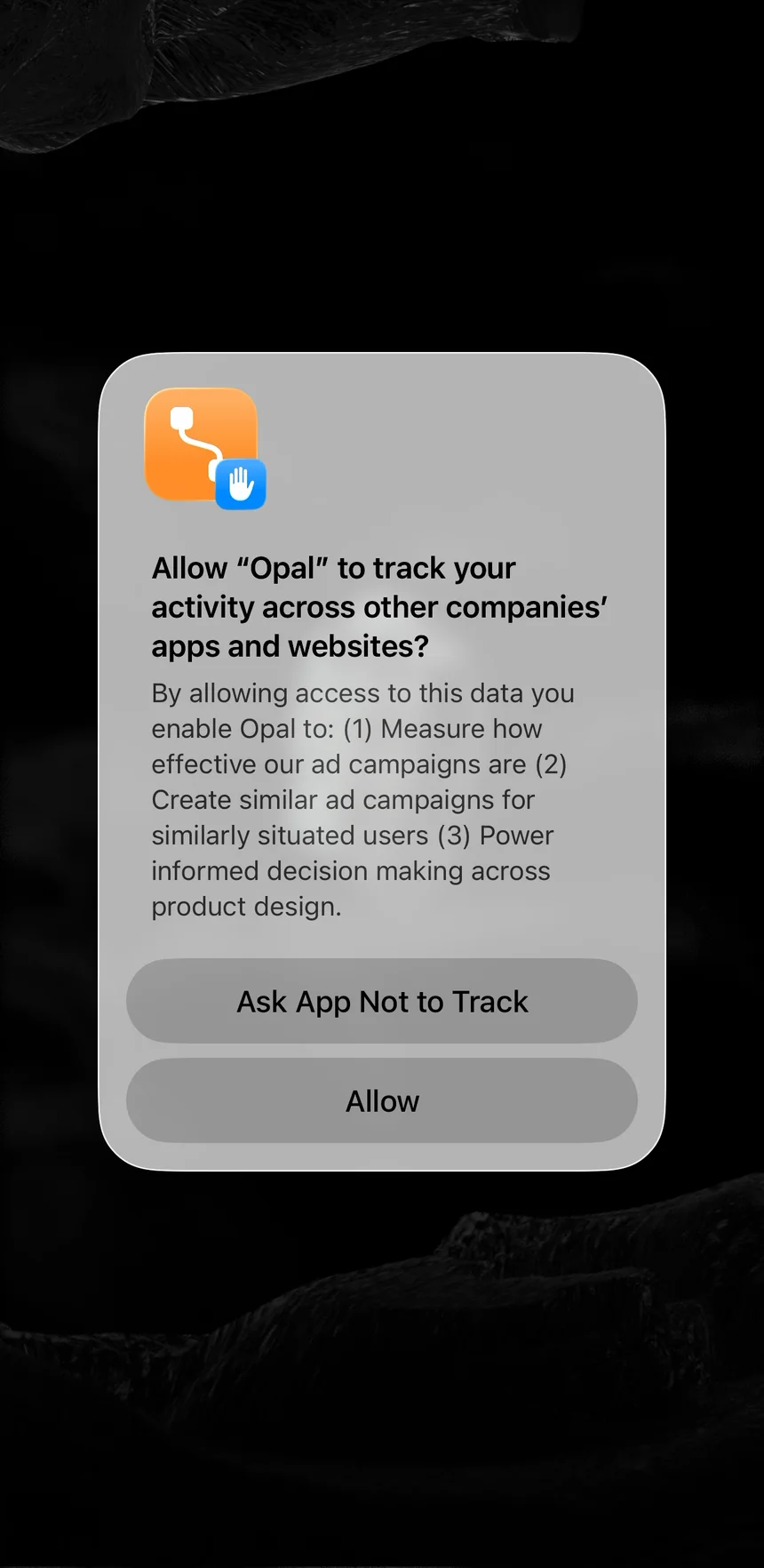
An app that wants to protect my focus starts by asking to follow me around other apps.
I tap "Ask App Not to Track."
❌ Give before you ask.
This prompt gives me nothing. And it comes before anything else.
Most people say no to it anyway. So it probably doesn't earn Opal much.
But it's my first moment in the app. And it's a moment of doubt.
The lesson: Ask for things after you've given people something. After the story, or after the first rule.
Then the stone cracks open
A rough grey stone, floating in the dark.
"An Opal only reveals its fire to those who slow down enough to look."
"Look closer." I tap. It cracks open into a glowing opal.
"Your focus is like this too. Dimmed by noise, apps, and everything else pulling at you."
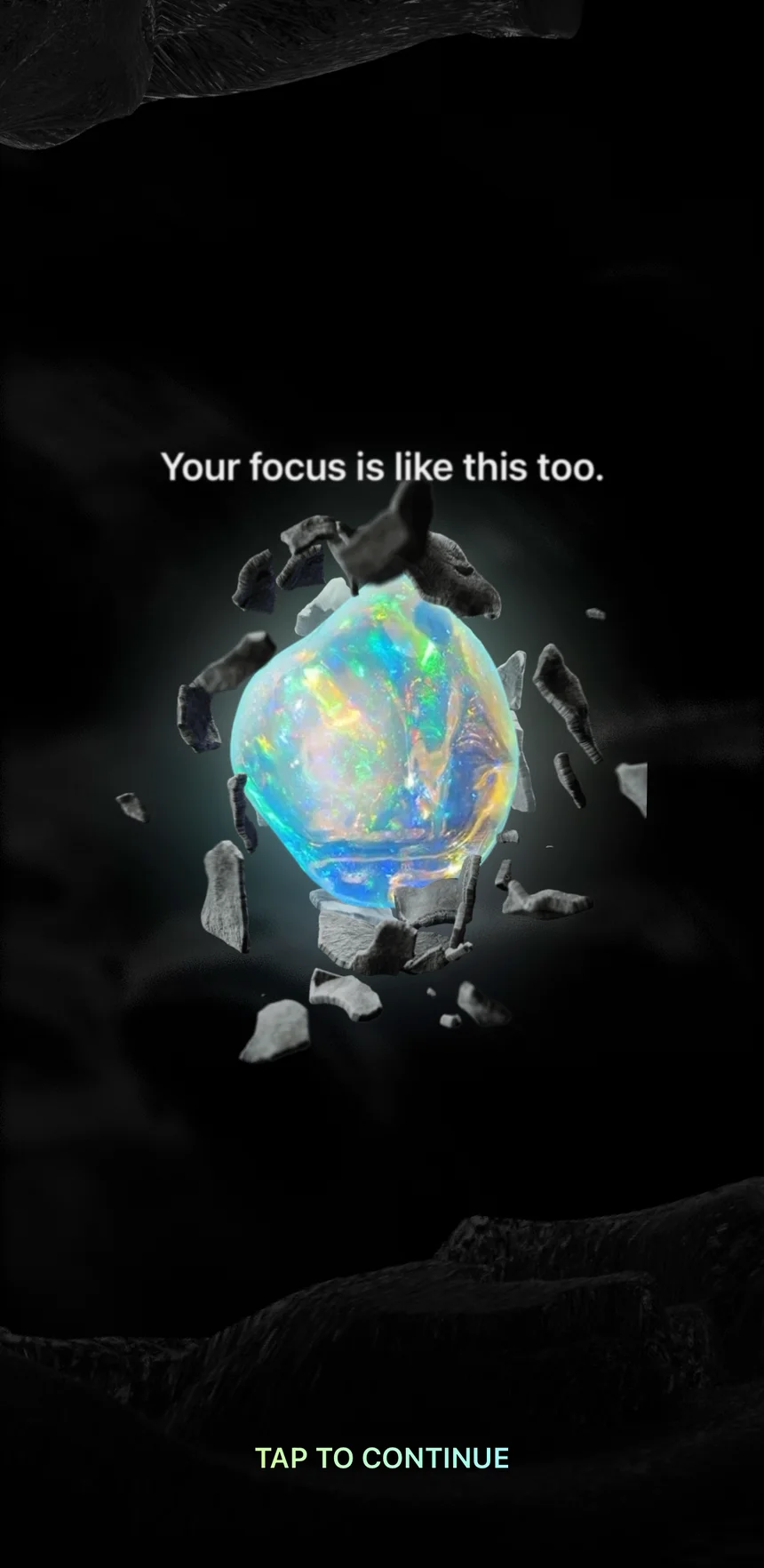
Goosebumps.
✅ Make the promise something people feel.
No list of features. No screenshots.
Just one idea: slow down, and you see more.
And I have to slow down to watch it, one tap at a time. The story does what the app does.
This is why Opal made the design award list.
The lesson: Don't explain your product's idea. Let people feel it.
2. A quiz that talks back, then a question it could answer itself
Then Opal talks to me.
"I'll help protect your focus. First, what's your name?"
"Hi, Eddy. I'm going to ask you a few questions. No need to overthink it."
Every answer gets a reply.
I pick "Be more present": "You want to be here, not somewhere else."
I pick Entrepreneur: "Always on. Even when you said you'd log off."
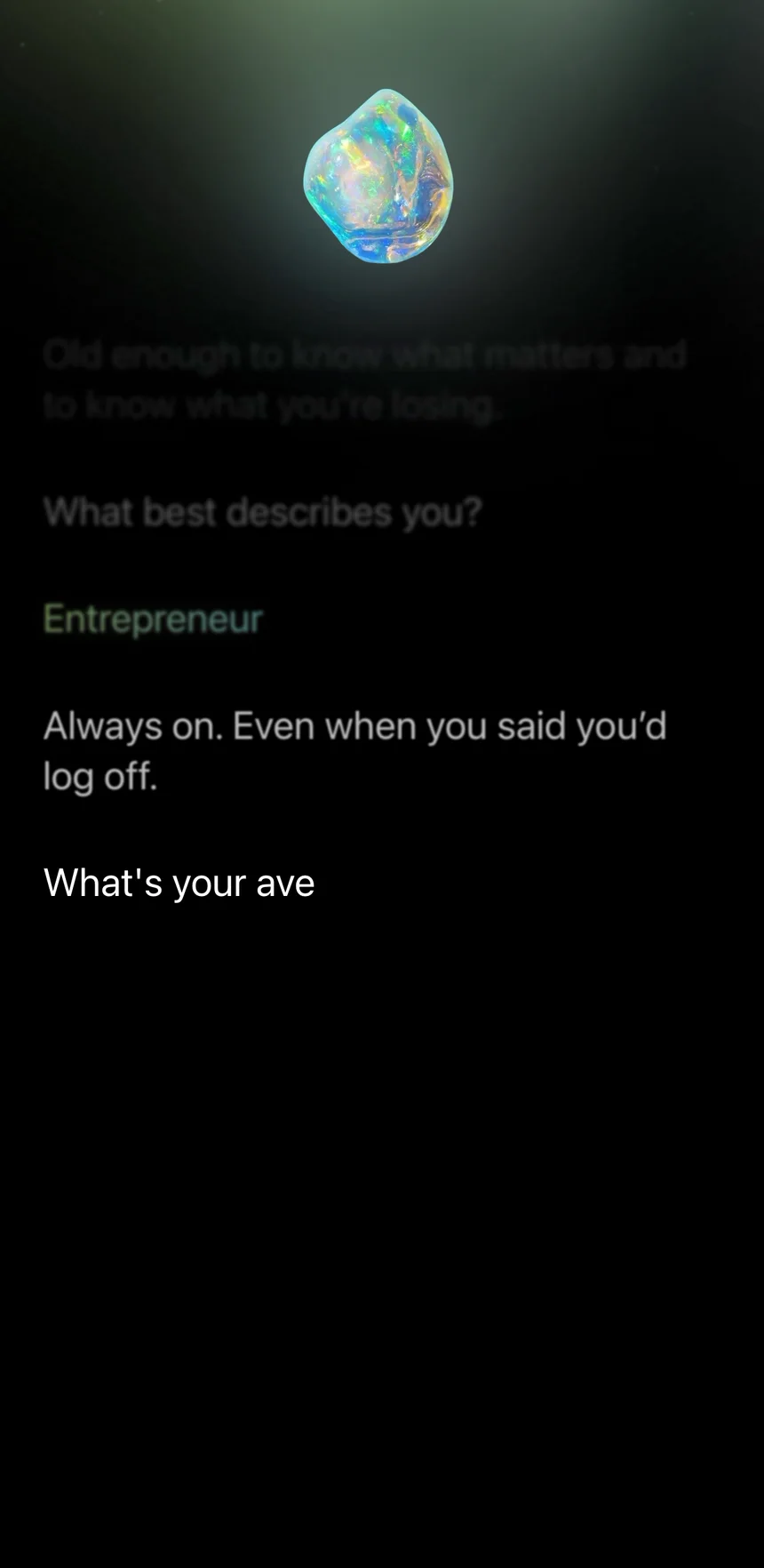
It gets me.
✅ Answer every answer.
Most quizzes feel like a form. This one feels like a talk.
Each reply shows Opal heard me. So I want to keep going.
The lesson: A short reply after each answer turns a quiz into a conversation.
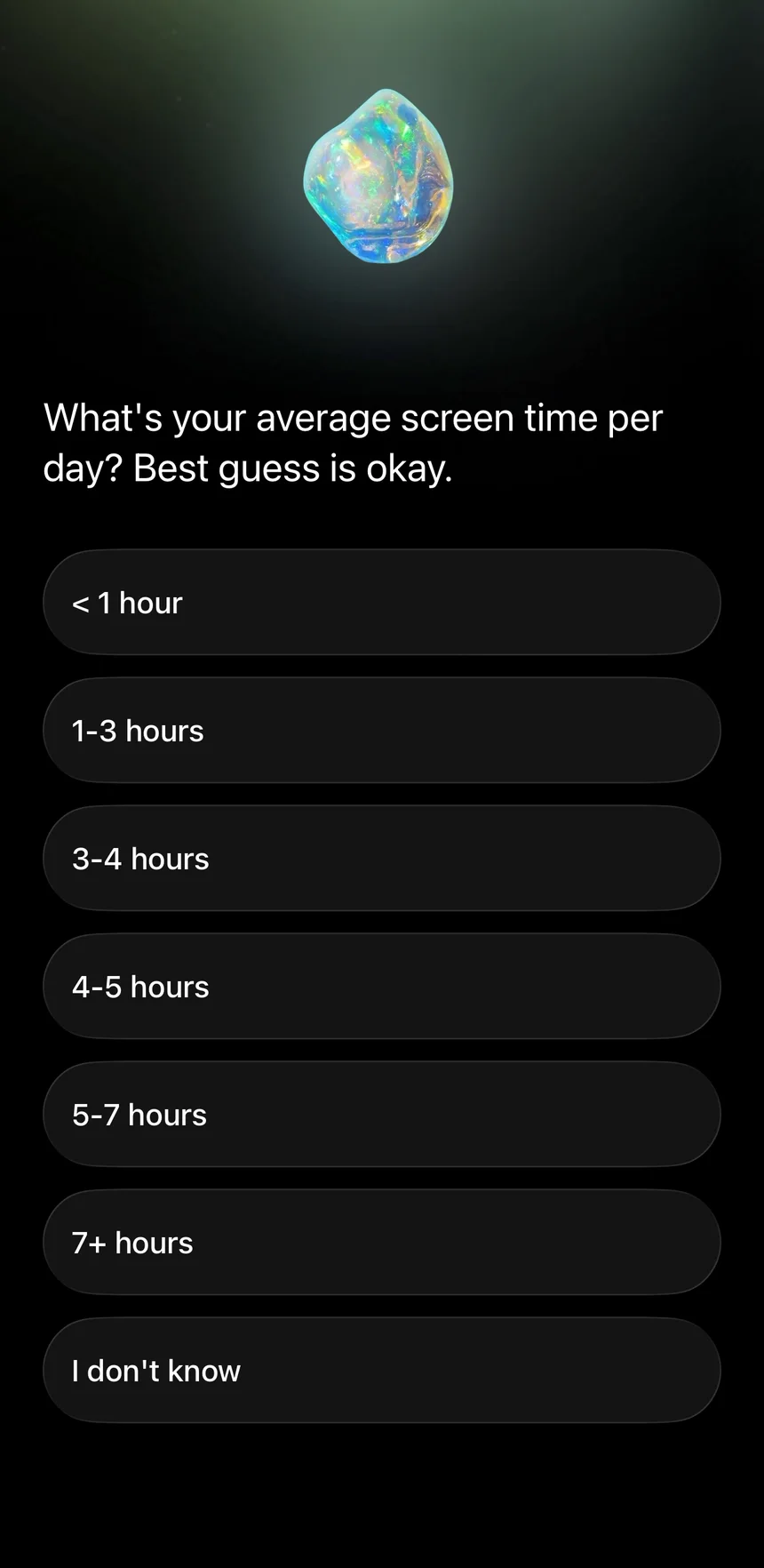
Then it asks me to guess
"What's your average screen time per day? Best guess is okay."
I have no idea. I pick "1–3 hours."
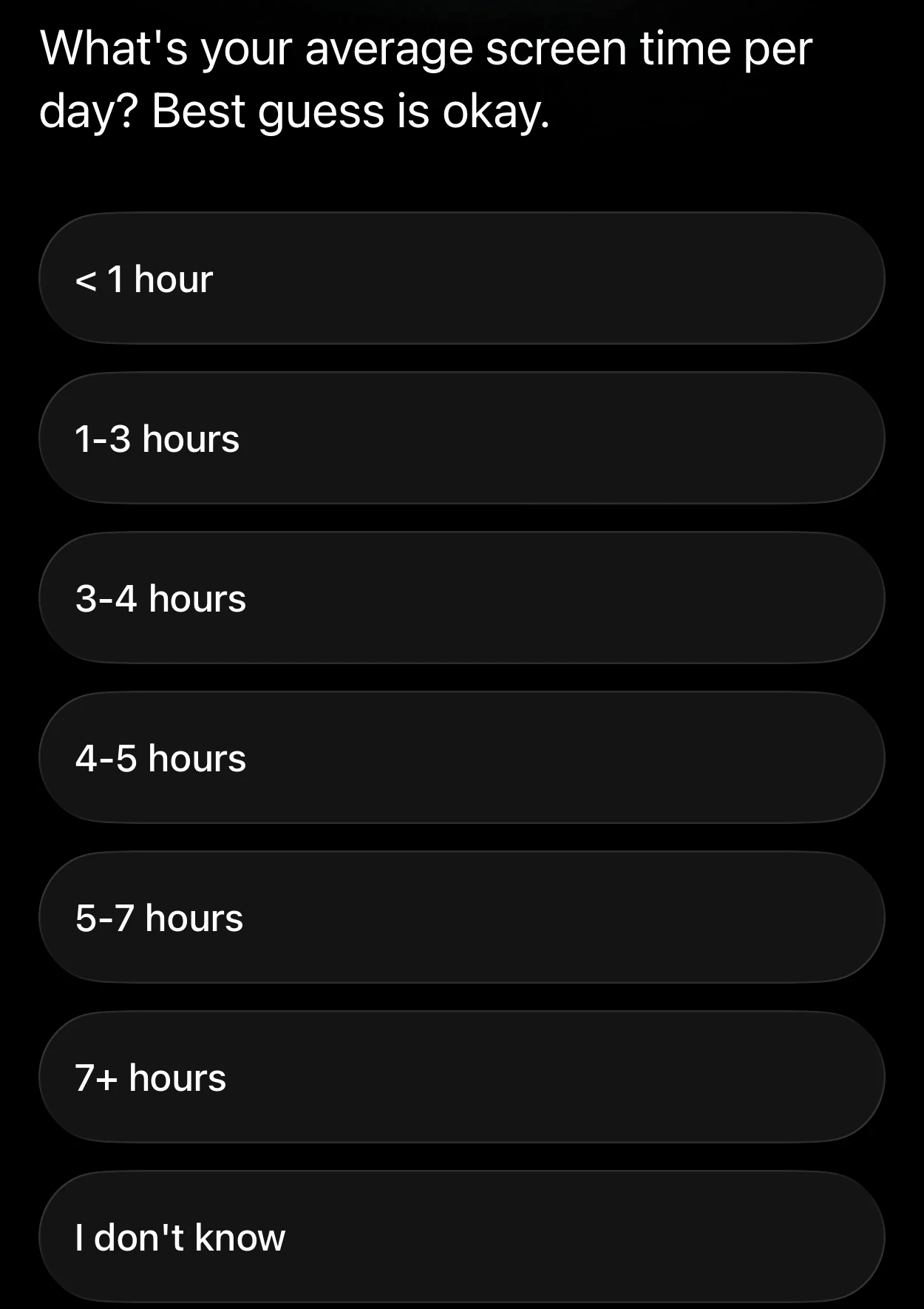
Wait.
Opal is a screen time app. It can see my real number.
Why is it asking me to guess?
3. Thirteen years, built on my guess
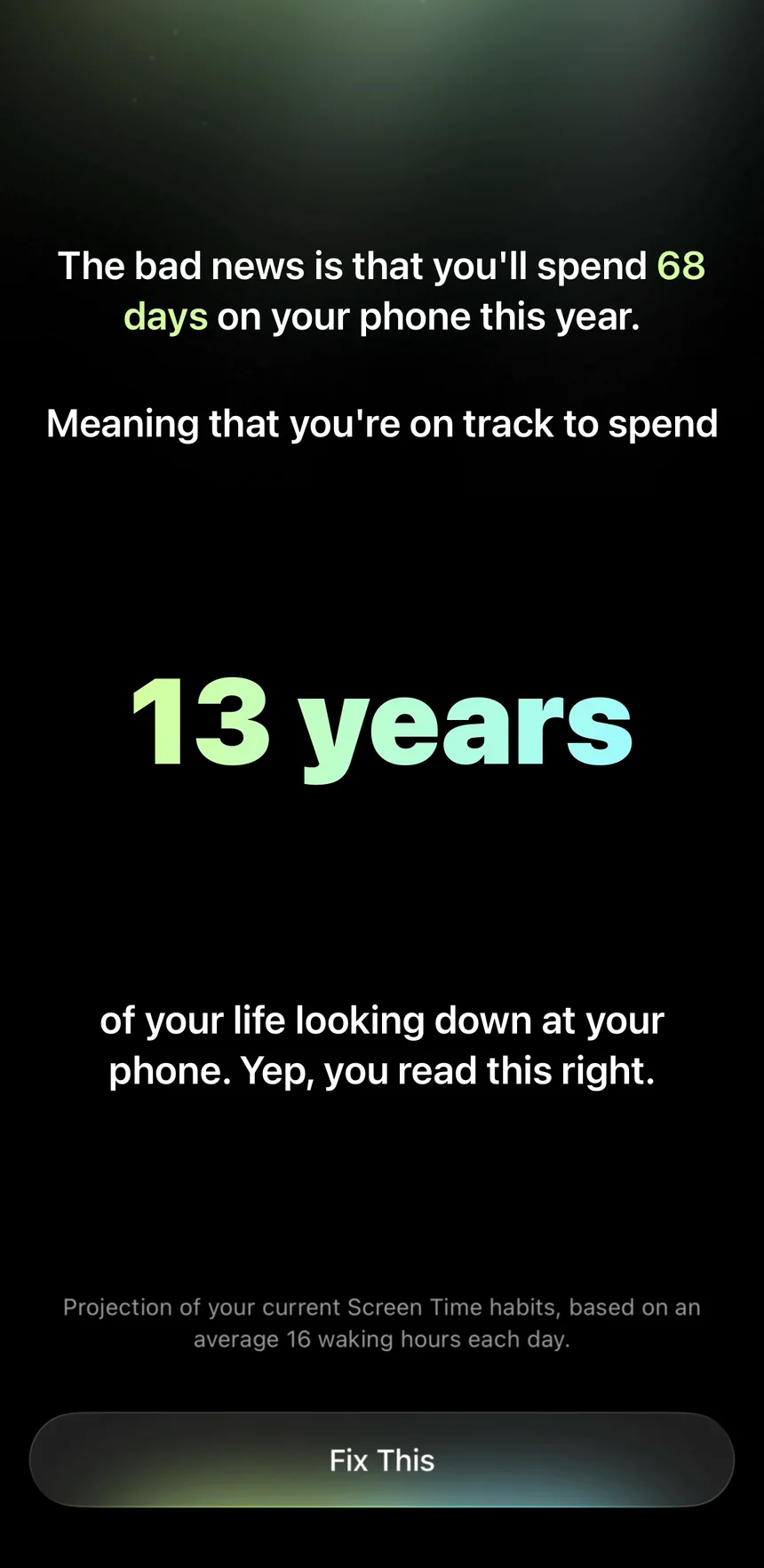
"The bad news is that you'll spend 68 days on your phone this year. Meaning that you're on track to spend 13 years of your life looking down at your phone."
A counter rolls up to 13. It's scary. It works.
Then I do the math.
68 days is about 3 hours a day, if you count 16 waking hours. That's the top of my guess.
The small print says:
"Projection of your current Screen Time habits."

But Opal hasn't seen my Screen Time yet. It's my guess, made bigger.
❌ Measure before you scare.
People are bad at guessing their screen time. That's the whole reason screen time apps exist.
What we think we do and what we really do are two different things. That gap is Opal's whole product.
And its onboarding asks what I think.
The lesson: If your app can measure something, don't ask people to guess it.
4. The best permission screen I've seen, one minute too late
"The good news is that Opal can help you get back 4 years+."
Then:
"Let's connect Opal to Screen Time settings. Securely."
A copy of Apple's box, with an arrow pointing at Confirm. And under it:
"Your information is protected by Apple and will stay 100% on your phone."
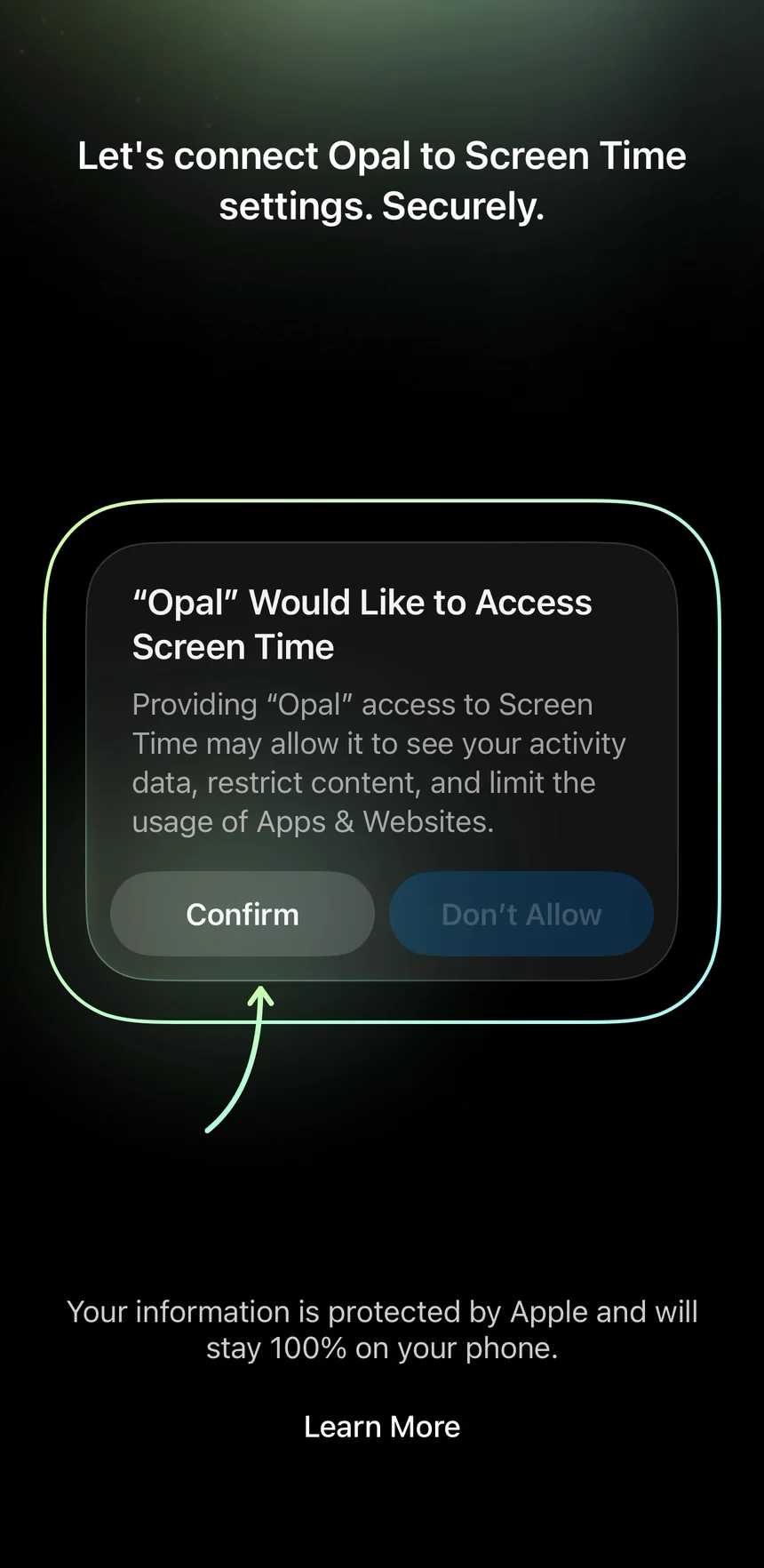
That's exactly my worry. Answered before Apple even asks.
I tap Confirm, then Face ID. Same for notifications.
✅ Answer the worry before the prompt.
A permission box from Apple is scary. It's grey, it's formal, and it doesn't say why.
Slack had the same problem when it asked for people's phone contacts. People said no, because those were their friends, not their coworkers. Slack fixed it by answering that worry first.
Opal does it in one line. And it shows me which button to press.
The lesson: Before the system asks, say why you need it and what you won't do with it.
Look at the order
So the order was:
- Guess my screen time.
- Scare me with it.
- Then ask to see the real one.
All in one minute.
From this moment on, Opal has my real number.
Remember that. It matters on the paywall, one minute from now.
The plan is my guess again
"Eddy, Opal will get you back 4 years of your life."
30% less screen time, down to 2h 6m a day.
That's 3 hours minus 30%. My guess again.
"Let's solidify it with a fist bump."
I hold the button. A fist bumps back.
That part is fun.
What I'd test
I'd ask for Screen Time first, before the guess. Then I'd build the scary number from my real one.
My hypothesis: If the 13 years come from your own phone, you'll believe them. And more people will start the trial.
I'd count two things. How many people say yes to Screen Time. And how many start a trial after the 13 years. If I ask earlier, there's less story before the ask. So I'd watch the first number closely.
5. A trial reminder I get to pick
"Get 2+ hours back every single day. Start your free week."
Then the best screen in the trial:
"When should we remind you before your trial ends?"
2 days before, or 3. I get to pick.
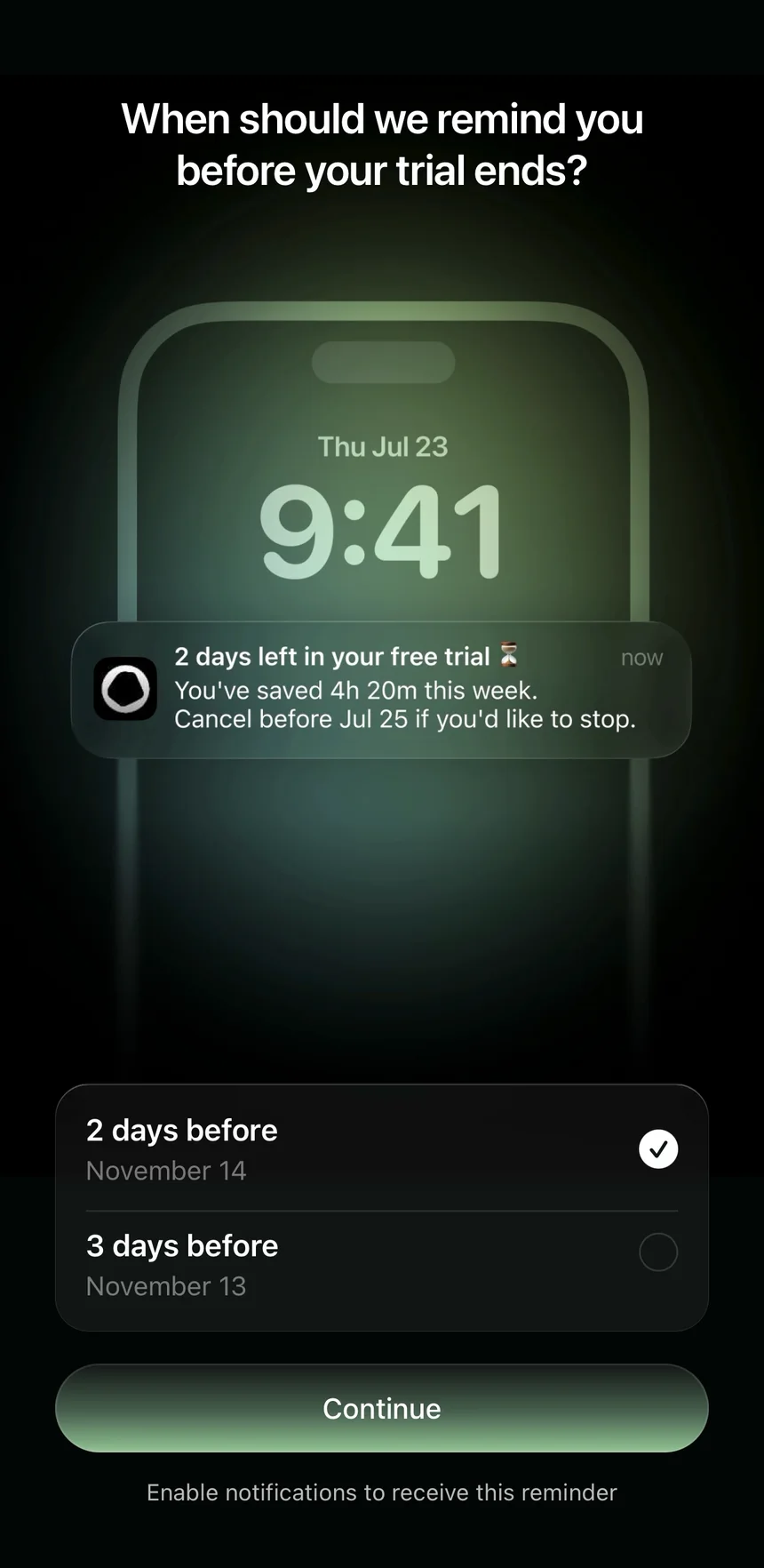
It even shows the message I'll get on my lock screen:
"2 days left in your free trial. You've saved 4h 20m this week. Cancel before Jul 25 if you'd like to stop."
Now I'm not scared to start.
✅ Let people pick when you remind them.
The biggest fear with a free trial is forgetting to cancel.
Blinkist showed people a clear timeline of when their trial ends and when they'll pay. More people started a trial, 23% more.
Opal goes one step further. I pick the day. And I see the exact message, with how much time I saved.
The lesson: Take away the fear of being charged by surprise, and more people will say yes to the trial.
6. The paywall shows a stranger's numbers. Mine come after the trial starts.
The price screen.
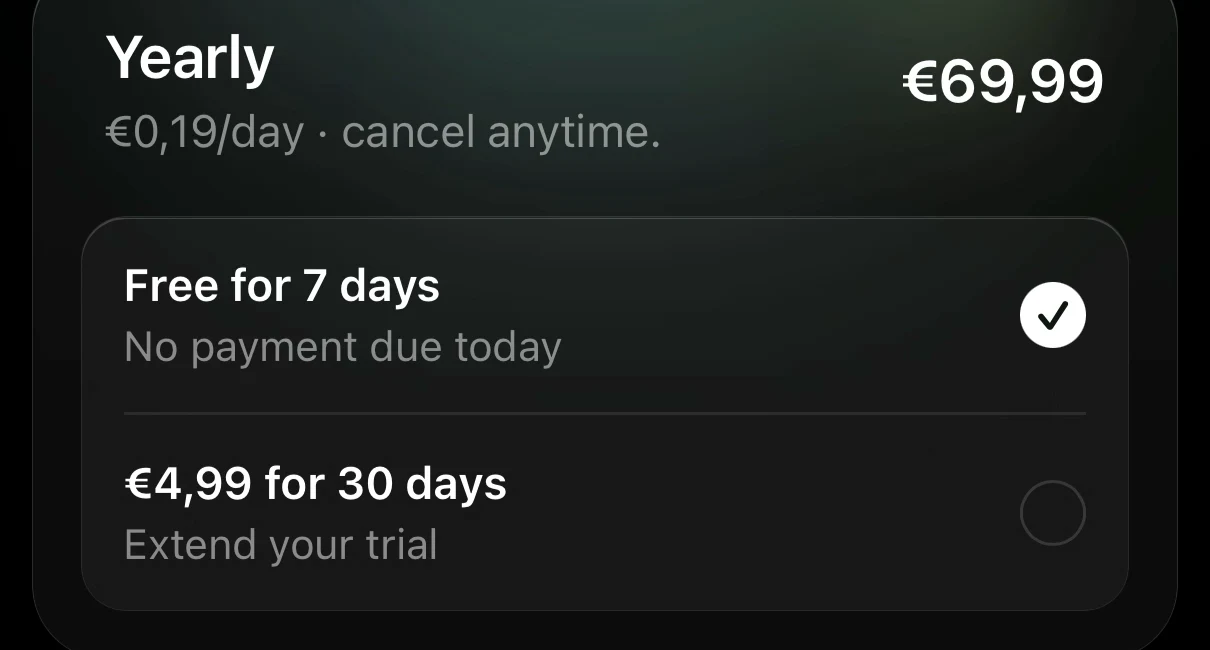
Yearly: €69.99. "Free for 7 days. No payment due today." Or €4.99 for 30 days.
Other plans: €19.99 a month with 7 days free, or €9.99 a week with 3.
At the top, a slide:
"Today 6h 32m. Your target 3h 32m."
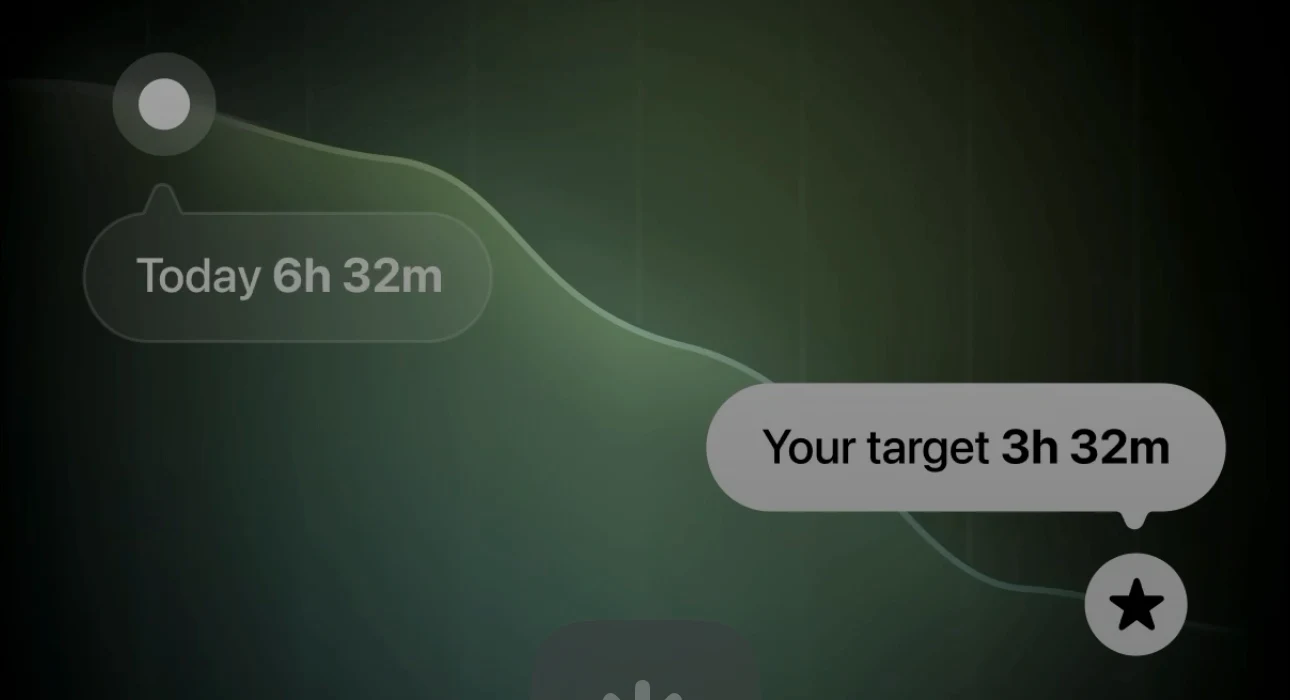
Those aren't my numbers.
Opal has had my real Screen Time for a minute now. It just isn't showing it to me. Yet.
Where my real number shows up
I'll see it later, on the home screen, after I've started the trial:
"Screen Time 3h 12m." YouTube 30m. Instagram 21m. WhatsApp 18m.
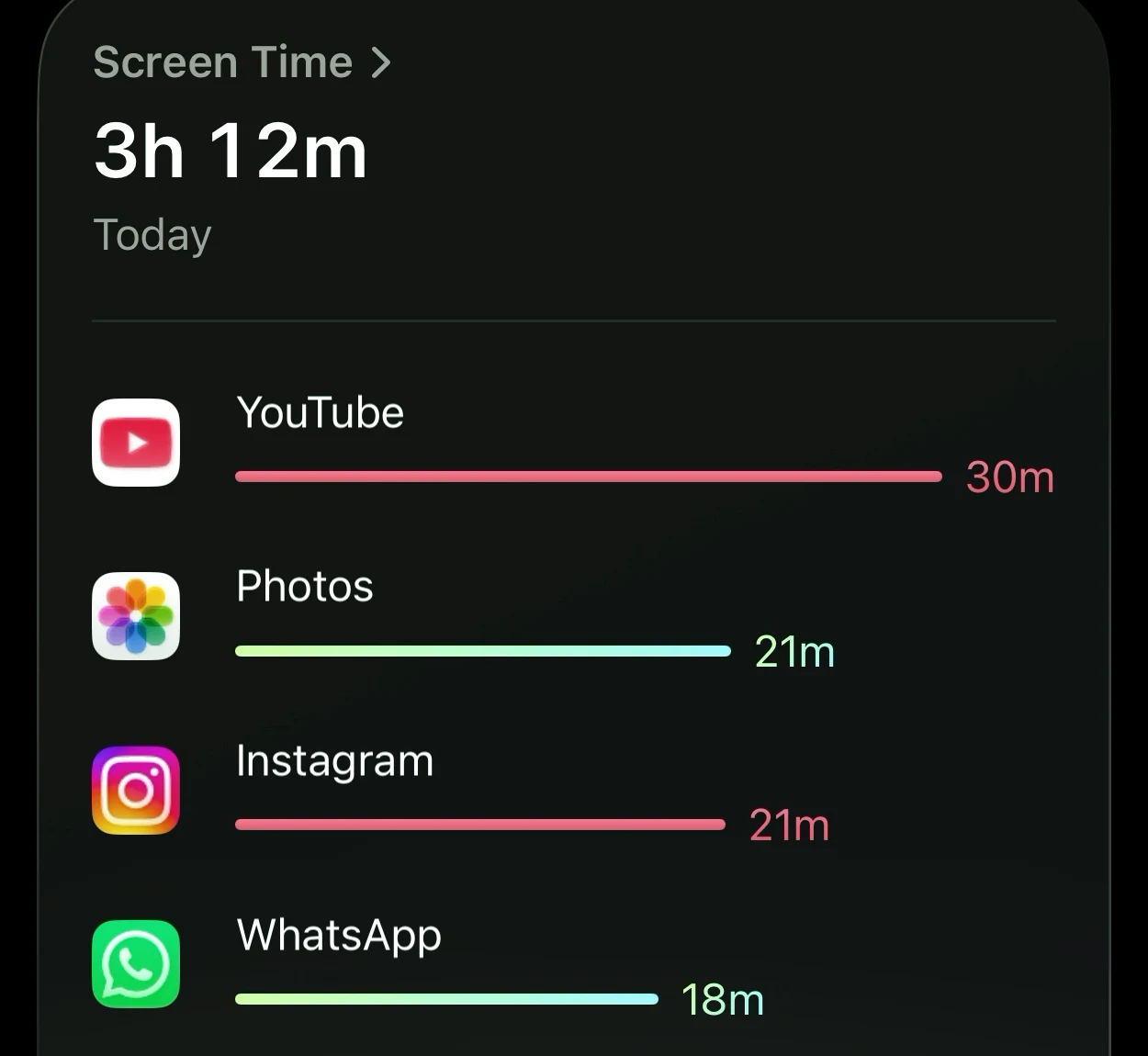
Here's the order, from my recording:
- 3:06 I give Opal access to my Screen Time.
- 4:08 The paywall shows a stranger's 6h 32m.
- 4:34 I start the trial.
- Later The home screen shows my real 3h 12m.
My guess was too low. My real number is higher than what I told the quiz.
"13 years" from my own data would hit harder. And I'd believe it.
That's the screen that would have sold me. And it comes after the decision.
❌ Show people their own number before the paywall.
This is where I decide if Opal is worth €69.99.
"Today 3h 12m. Your target 2h 14m." That would be my own reason to pay.
Opal has that number. It shows it on the home screen. Just not here, where I'm deciding.
A stranger's 6h 32m is someone else's problem. My 3h 12m is mine.
The lesson: Your most convincing screen belongs before the paywall, not after it.
What I'd test
I'd swap the stranger's numbers on the paywall for your own screen time. Plus a goal 30% lower.
My hypothesis: Show people their own number on the paywall, and more of them will start the trial. More will pick the yearly plan, too.
I'd count trial starts on the paywall, and how many pick yearly.
I pick monthly: one free week, then €19.99 a month. Apple's box, double-click, Done.
7. "Get PRO", right after I started my trial
Setup goes on. Then:
"Ready to fully commit? With Hard Mode, you can't temporarily unblock apps."
And a button: Upgrade to Opal PRO.
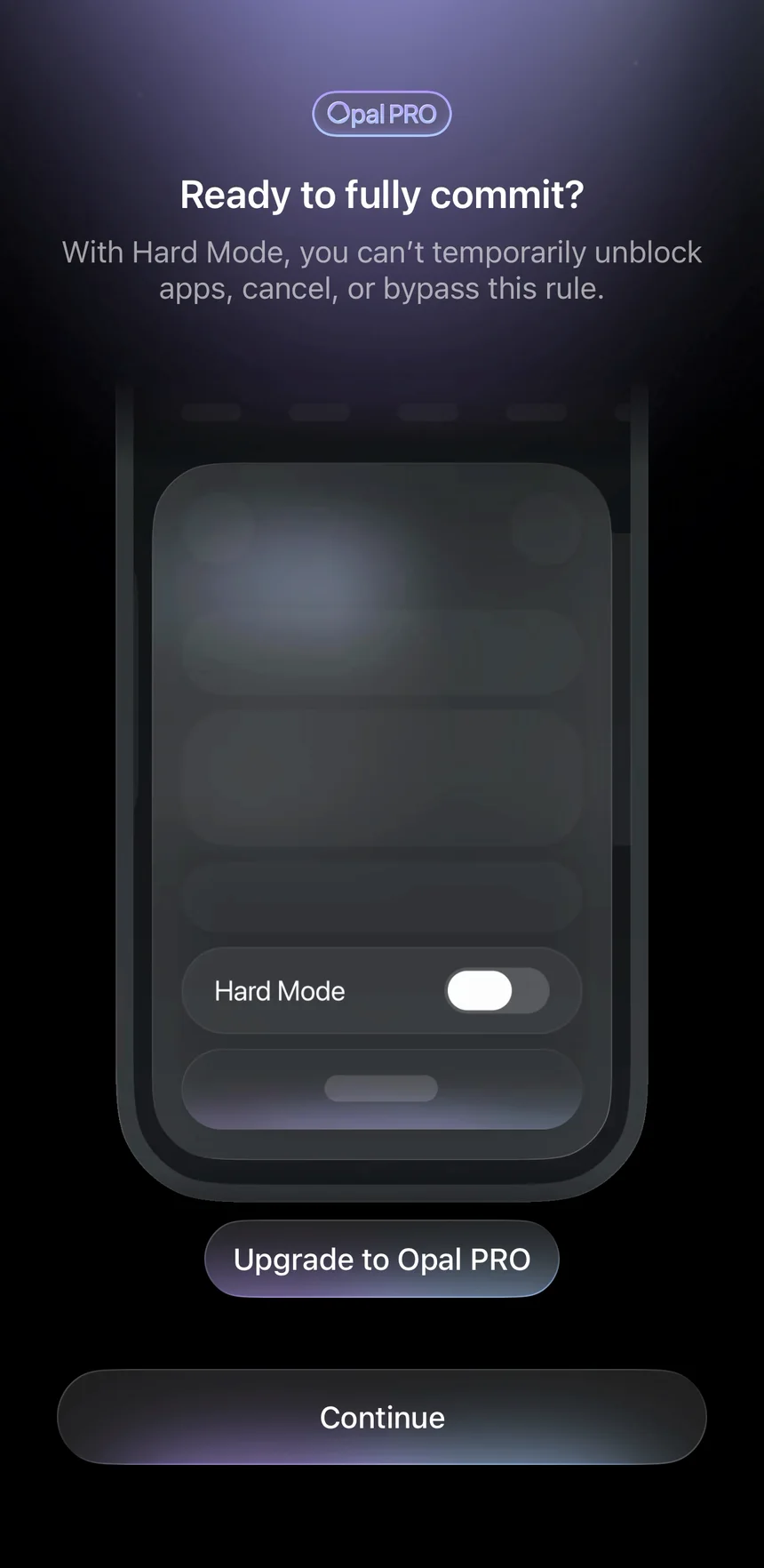
I just started my trial.
On the home screen, a badge: "Get PRO."

Then:
"Invite 20 friends and get Opal PRO for free for 2 years."
Apple's box said "Monthly Plan." So what did I just buy? Is that PRO? Or not?
I can't tell.
❌ Celebrate the trial. Don't sell the next one.
Right after someone starts a trial is a special moment. They just said yes.
Good subscription apps change the app right there. They say thank you, and show what's now open.
Opal changes the app to sell me more.
The lesson: After someone pays, show them what they got. Sell the upgrade after they've used it.
8. My first rule blocks my work app
"Choose your biggest distractions."
A short demo shows how: open Social Media, tick Instagram and TikTok. Easy.
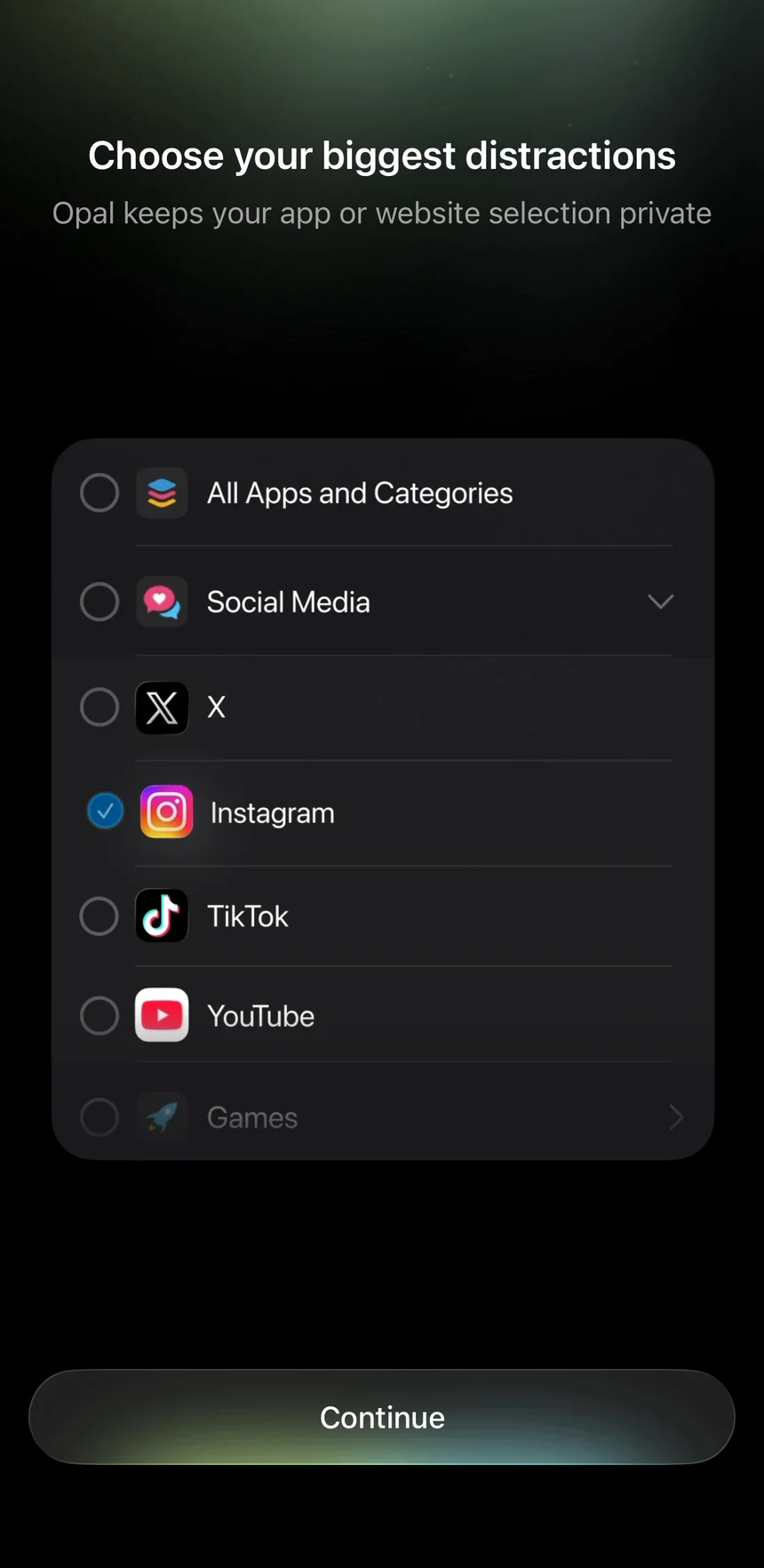
Then Apple's real list opens.
Nothing ticked. Everything folded into groups.
I tap Continue:
"Pick an app, website, or category to continue."
So I tick whole groups. Opal warns me:
"Selecting a category may block apps you don't expect."
I end up with 52 apps and 10 websites.
Then:
"Eddy, here are the rules I propose."
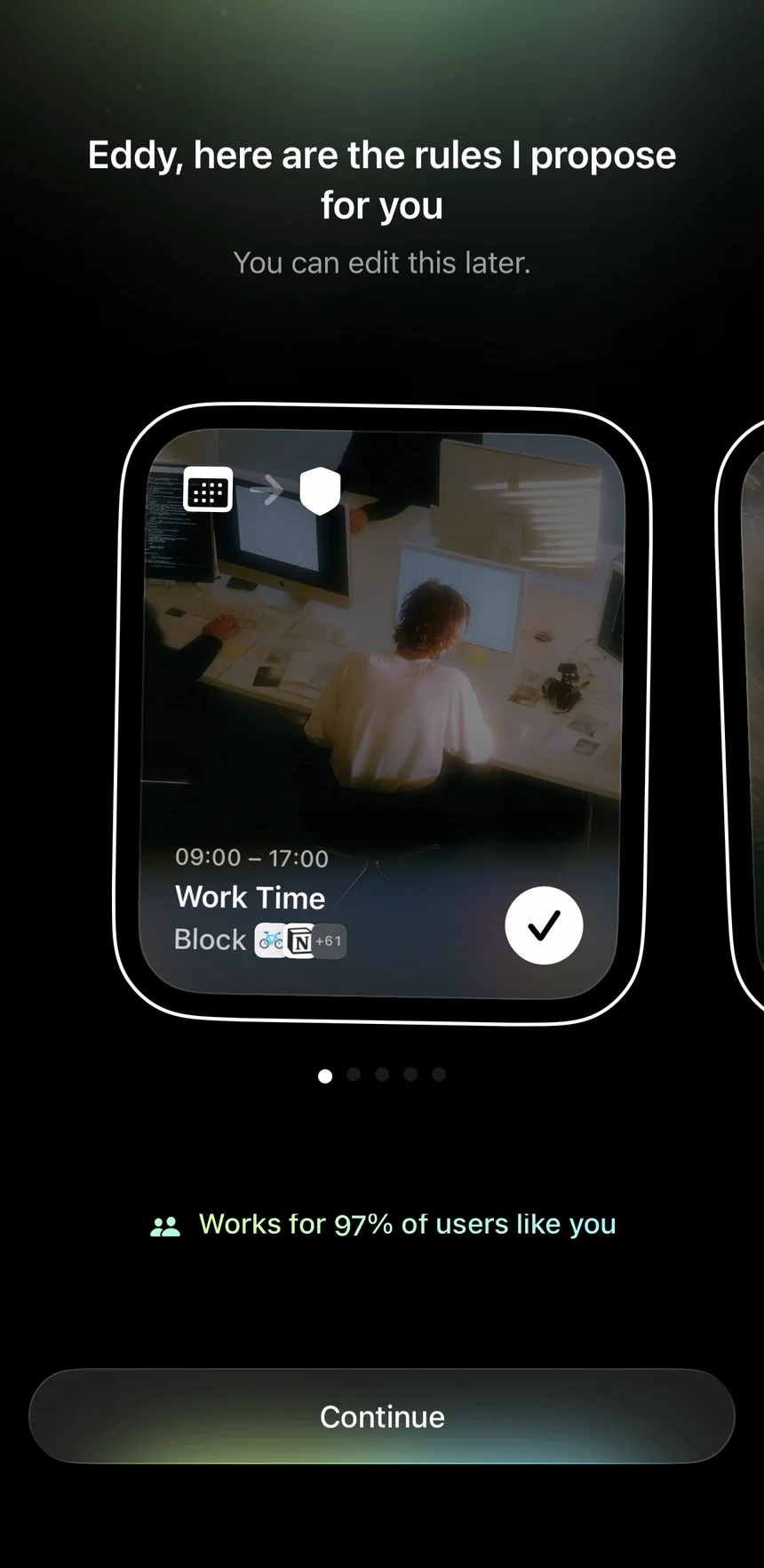
Work Time, 9 to 5. Block: a bike icon, Notion, and 61 more.
Notion is my work app.
Instagram and YouTube aren't on it.
❌ Make the right choice the easy one.
Apple's list can't be filled in for the user. That's Apple's rule, not Opal's.
So the help around the list is Opal's job.
And Opal has what it needs. It knows my worst apps. It shows them on its own home screen.
It could name them on top of the list. And say in words what my rule blocks, before it starts.
The lesson: Point people to the right choice. Then say back what they picked, in plain words.
Welcome to Opal
Confetti.
"You're all set up. Welcome to Opal!"
Then the home screen. And there it is, at last: my real number. Screen Time 3h 12m. Three "Culprits": YouTube, Photos, Instagram.
The screen that would have sold me. After the paywall.
Opal knows just what pulls at me. It's right there on the home screen.
And my rule blocks something else.

What I'd test
I'd start the app list with your top two apps. Then I'd say the rule in plain words before it starts.
My hypothesis: If the first rule blocks the apps you really lose time to, you'll feel Opal work in week one. And you'll be more likely to pay when the trial ends.
I'd count three things. How many first rules block a top app. How often people unblock in week one. And how many pay after the trial.
9. The breath before the unblock is perfect
I tap Unblock. A ring of light over dark rock:
"Breathe in… Breathe out."
Continue waits a few seconds. Then: "For… 5 minutes." Unblocked.
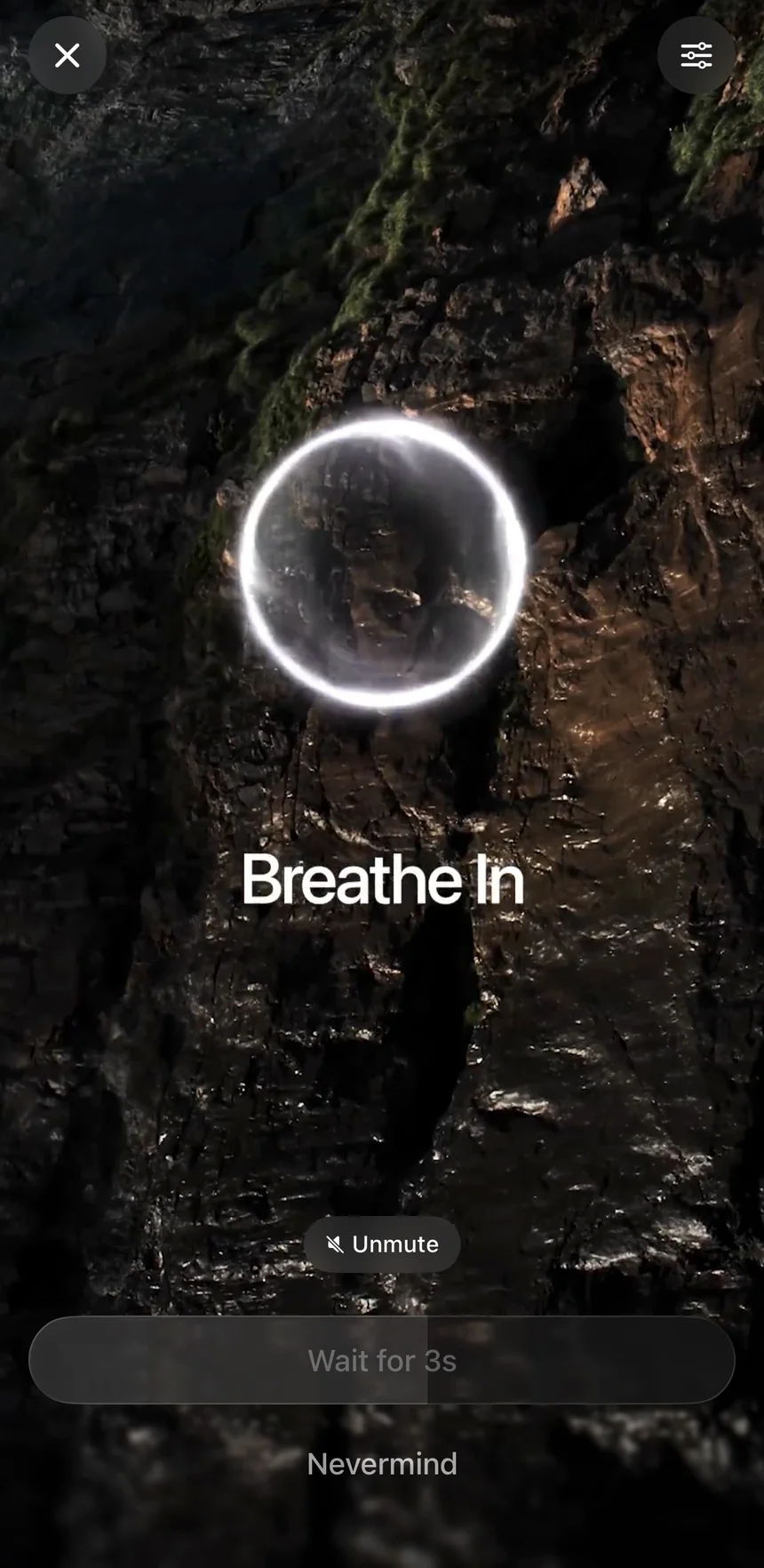
I love this.
It doesn't stop me. It makes me notice.
✅ Put a speed bump before the unblock.
Willpower loses to a phone every time.
A small pause between me and the app works better than a wall. I can still open it. I just have to choose to.
The lesson: You don't need to stop people. Slow them down for a second, and let them choose.
In front of the wrong apps
But look what it unblocks: Health & Fitness and Notion.
To open Notion at work, I have to breathe first.
Instagram opens without one.
10. How I'd redesign the paywall and the setup
Opal already has every piece. The great permission screen. The scary number. The apps I lose my day to. The rule. And my real number, a minute before the paywall.
My redesign doesn't add a screen. It puts my number where I decide, changes the order, and says the rule in words.
First, my number on the paywall
Same screen. Same plans. Same price. Only the numbers change.
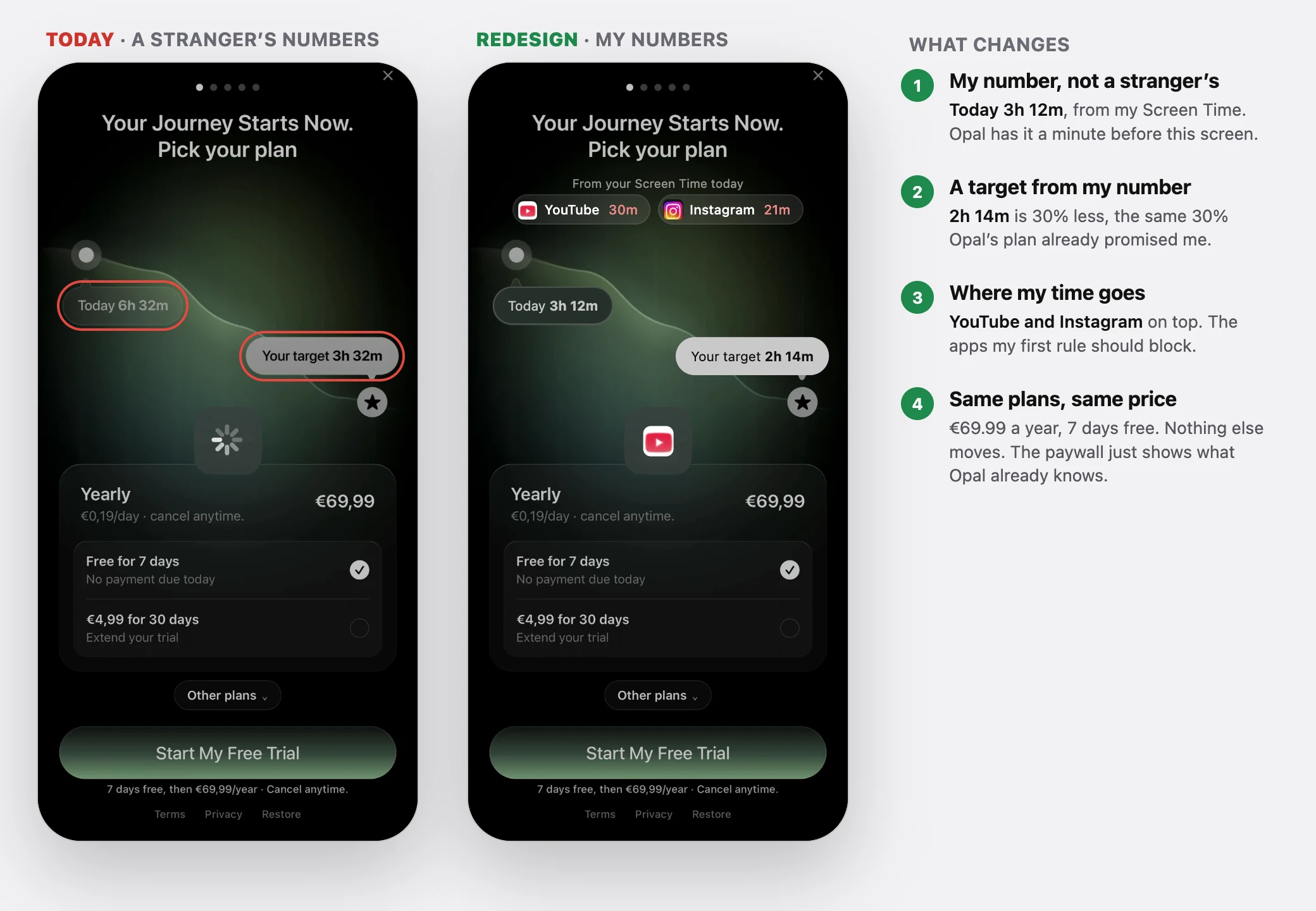
"Today 3h 12m. Your target 2h 14m."
And above them, where my time goes: YouTube 30m, Instagram 21m.
Why: Opal already has all of this when the paywall loads. Nothing has to move. Now I decide with my own number in front of me, not a stranger's.
Then the setup
The rest of my redesign fixes the order of the screens before it. That way, the scary number is mine too.
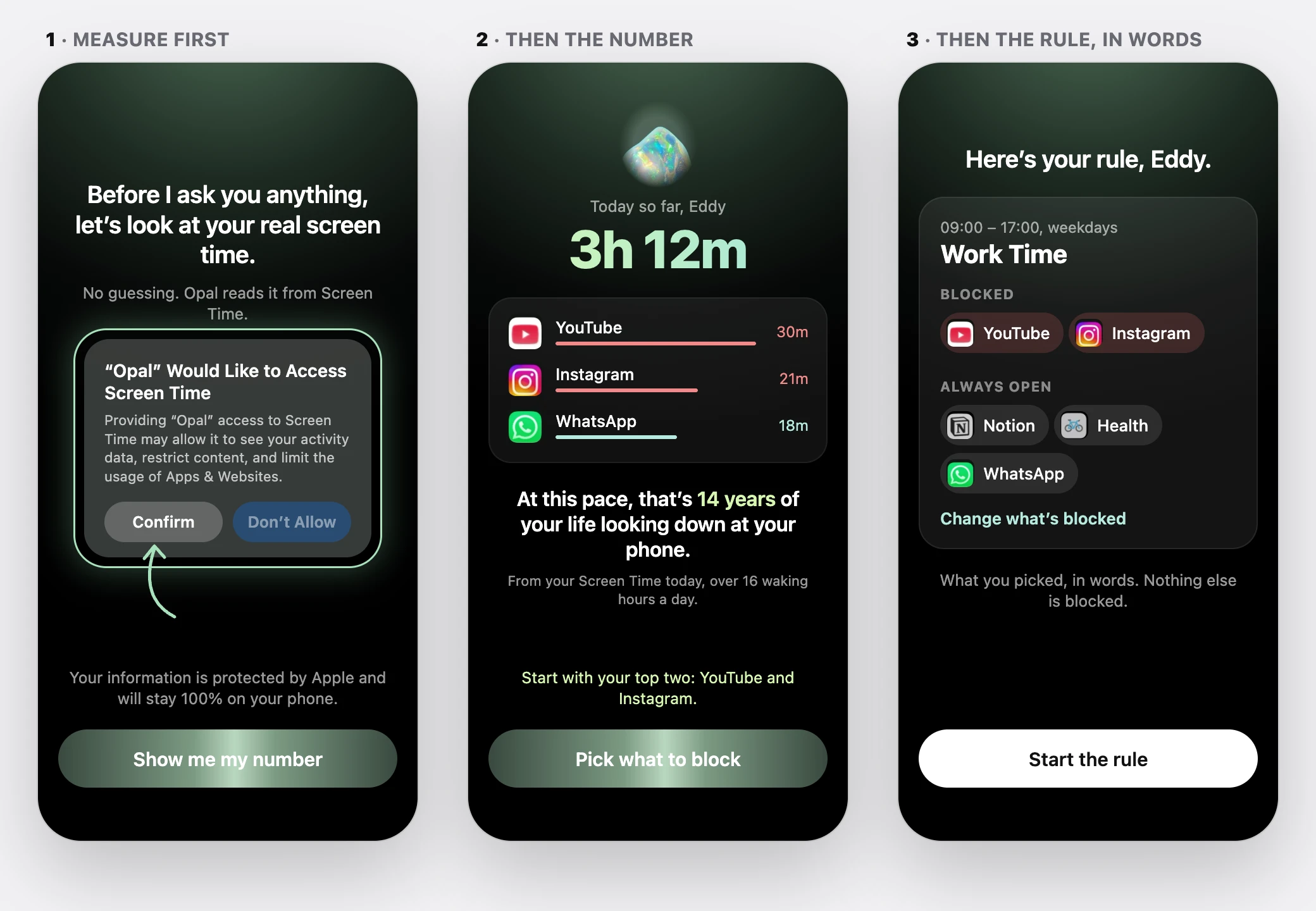
Second, ask for Screen Time first
Opal's own permission screen, moved before the screen time question.
"Before I ask you anything, let's look at your real screen time."
Why: The permission screen is already Opal's best screen. Put it where it pays off.
Third, the scary number, from my data
"Today so far: 3h 12m. YouTube 30m, Instagram 21m."
At this pace, 14 years.
Why: Same shock. But I can't argue with it. I didn't make it up.
Fourth, the rule, in words
The list starts from my top two. Then:
"Blocked: YouTube, Instagram. Always open: Notion, Health, WhatsApp."
Why: Now the breath sits in front of the apps I really lose my day to.

11. Three experiments I'd prioritize
If I worked on Opal, I'd start with three tests. Each one aims at more people paying after the trial.
Experiment 1: My number on the paywall
Problem: The paywall shows a stranger's "6h 32m", a minute after Opal got my real number. I see my own 3h 12m only after I start the trial.
Change: Show my own screen time today on the paywall, and a target 30% lower.
Hypothesis: With my own number on the paywall, more people start the trial. More pick yearly.
Measure: Trial starts on the paywall. How many pick yearly.
Experiment 2: Measure first
Problem: Opal asks me to guess my screen time, builds "13 years" on the guess, and only then asks to see the real number.
Change: Ask for Screen Time first. Then build the 13 years and the plan from my real number.
Hypothesis: People can't argue with their own number. So more of them start the trial.
Measure: Yes to Screen Time. Trial starts after the 13 years. Paid after the trial.
Experiment 3: Block the culprits first
Problem: My first rule blocked Notion during work hours. Instagram and YouTube, the top apps on Opal's own home screen, stayed open.
Change: Start the picker with my top two apps, and say the rule in words before it starts.
Hypothesis: If the first rule blocks the right apps, people feel Opal work in week one. More of them pay.
Measure: First rules with a top app. Unblocks in week one. Paid after the trial.
I'd prioritize the first experiment. It's the cheapest: Opal already has my real number when the paywall loads. Nothing has to move. The paywall just has to show it.
These are guesses to test, not sure wins. In the second test, I'd watch the yes to Screen Time closely. Asking earlier means less story before the ask.
12. Opal's best screen comes after the paywall
Opal gets the hard parts right.
The story makes me feel the product.
The quiz talks back.
The permission screen answers my worry.
The trial reminder takes away my fear.
And the breath before the unblock is perfect.
But between those moments, the numbers belong to someone else.
A guess, made bigger.
A stranger's screen time on the paywall.
A rule that blocks my work app.
And the whole time, from one minute before the paywall, Opal had my real number. It showed it to me after I'd decided.
What Opal gets right
- The story: A stone that cracks open says the whole idea in fifteen seconds.
- A quiz that talks: Every answer gets a reply.
- The permission screen: It answers my worry before Apple asks, and points at the button.
- The trial reminder: I pick the day, and I see the message I'll get.
- The breath: A speed bump before every unblock, not a wall.
What I'd improve
- The paywall: Show my real number, which Opal already has, not a stranger's.
- The tracking prompt: Ask after the story, not before it.
- The guess: Ask for Screen Time first, and build every number from it.
- The "Get PRO" badge: Say what my plan includes, right where the badge is.
- The first rule: Start from my top apps, and say it in words.
The bigger lesson
Screen time apps have something most apps dream of. Your real data is one tap away.
Opal asks for that tap better than almost anyone.
Then it treats that yes like a setup step. But that yes is when the product could start. I first see my own number on the home screen, after the paywall.
Look at your own trial and ask one question: what's the most convincing screen in your product? Then check which side of the paywall it's on.
If it's after, people decide without it.
For Opal, the fix could be just one number on the paywall. A number it already has.
Same story. Same screens. Same price.
But this time, I'd decide with my own 3h 12m in front of me.
Does your onboarding ask people for something it could measure? I'd love to hear how your product handles it.
I break down real free trials to show where they lose potential paying customers and how to improve the experience.
Want me to review your trial? DM me "teardown" on LinkedIn.
Eddy
Melius made a great first image (after I paid)
Melius, Nov 9, 2026