If you know who I sell to, run the first search
8 min read · about Zero ·

If you know who I sell to, run the first search
Lessons from Zero: it read my website and my inbox, then gave me an empty search box.
1 / 23

Written by
Eddy Bogomolov
Growth PM for SaaS
What you'll learn
- If you know who I sell to, run the first search. Zero read my website and wrote who I sell to: “Early-stage teams, Founders, B2B SaaS.” Lead search then opened empty, with a stranger’s example inside.
- Say what you skipped, not just what you found. Zero pulled 24 people out of my inbox and said it skipped 290. The second number is why I trusted the first. In Attio, my newsletters became my top companies.
- Don’t block sign-up with a question I have to type. “How did you hear about us?” was a required, empty text box, with no list to pick from. “Create workspace” stayed grey until I typed something. So I typed “s”.
Zero read my website and wrote down who my customers are. Then it opened an empty search box with someone else’s customers as the example.
If you know who I sell to, run the first search, chapter by chapter
In this story, I run a small design business on my own. My clients come from my inbox and from people I know. I'd like a CRM that keeps track of them, and helps me find the next one.
Zero says it does both. Its homepage line: "Find, win and grow customers in one place."
So I started Zero's 14-day trial and recorded everything from the homepage to the first search.
Zero did something no CRM in my series has done. It read my website and wrote down who my customers are. Then it read my inbox and pulled out the 24 people who matter, and told me it skipped 290 who don't.
Then it showed me a checklist, and an empty search box with someone else's customers as the example.
I've now tried four CRMs. Pipedrive gave me an empty pipeline. Lightfield asked for my card before my inbox. Attio built a CRM from my inbox, newsletters and all. Zero fixes most of what went wrong in those three.
For this one, I also looked up what other CRMs show on day one, from HubSpot to Clay. Zero learns more about me than most of them. That makes the empty box stand out even more.
So this one isn't about what Zero is missing. It's about what it already knows and doesn't use.
I'm asking three things. Why does a list of what you left out build trust? Why make people type an answer before they can start? And what should a CRM do with the customer profile it wrote for you?
Let's get into it.
1. The homepage: an agent doing the work
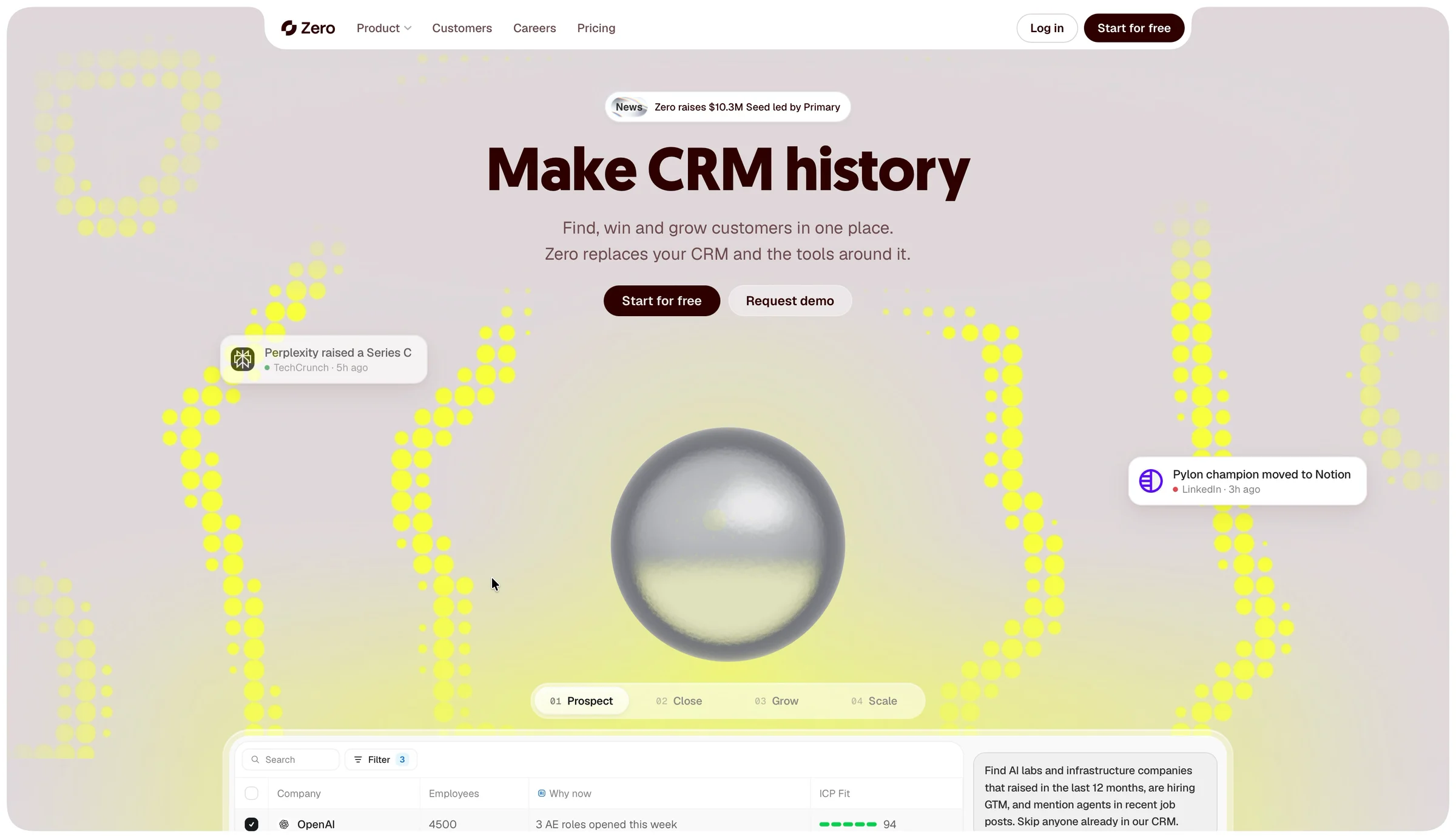
I open the Zero homepage. The big line:
"Make CRM history."
Under it: "Find, win and grow customers in one place. Zero replaces your CRM and the tools around it."
I scroll, and the page shows the product working.
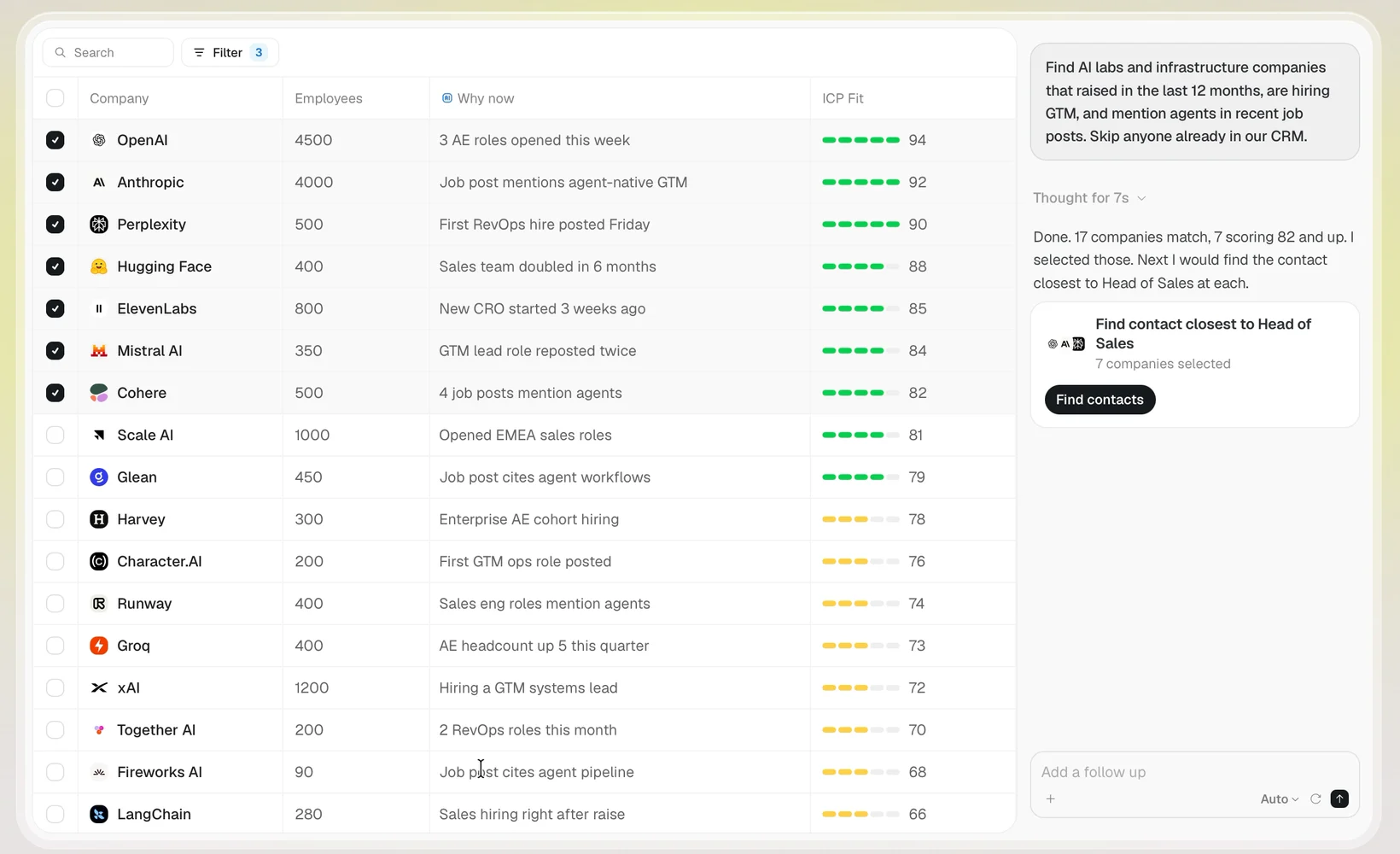
Someone asks: "Find AI labs and infrastructure companies that raised in the last 12 months, are hiring GTM, and mention agents in recent job posts."
The answer fills a table: OpenAI, Anthropic, Perplexity. Each row has a "Why now", like "3 AE roles opened this week", and a score.
Then: "Done. 17 companies match, 7 scoring 82 and up. I selected those. Next I would find the contact closest to Head of Sales at each."
✅ Show the product doing the job.
I don't have to guess what Zero does. I watch it find customers for someone.
Keep that demo in mind. It comes back at the end.
2. "Start for free", but where do I sign up?
I click "Start for free." Three ways in: Google, Microsoft, or "Sign in with email."
I pick Google, and my Gmail.
"Please use a work email address to sign up."
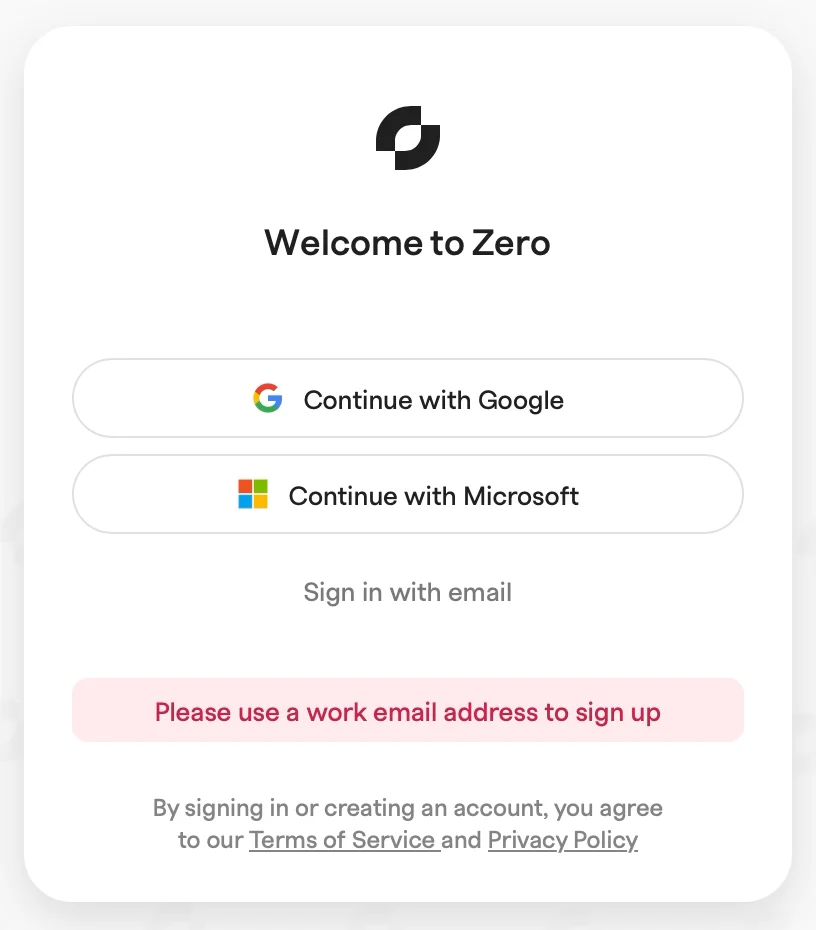
I wrote about this exact wall in my Attio teardown. Attio blocked my Gmail, then asked to read it two minutes later. Zero does the same, at 2:20. I won't repeat it.
But Zero adds a new twist.
I clicked "Start for free." So in my head, I'm making an account. I see a box for my email, and I type my Gmail and a new password, the way I would on any sign-up form.
"Invalid email address or password. If you don't have an account yet, continue with Google or Microsoft to create one."
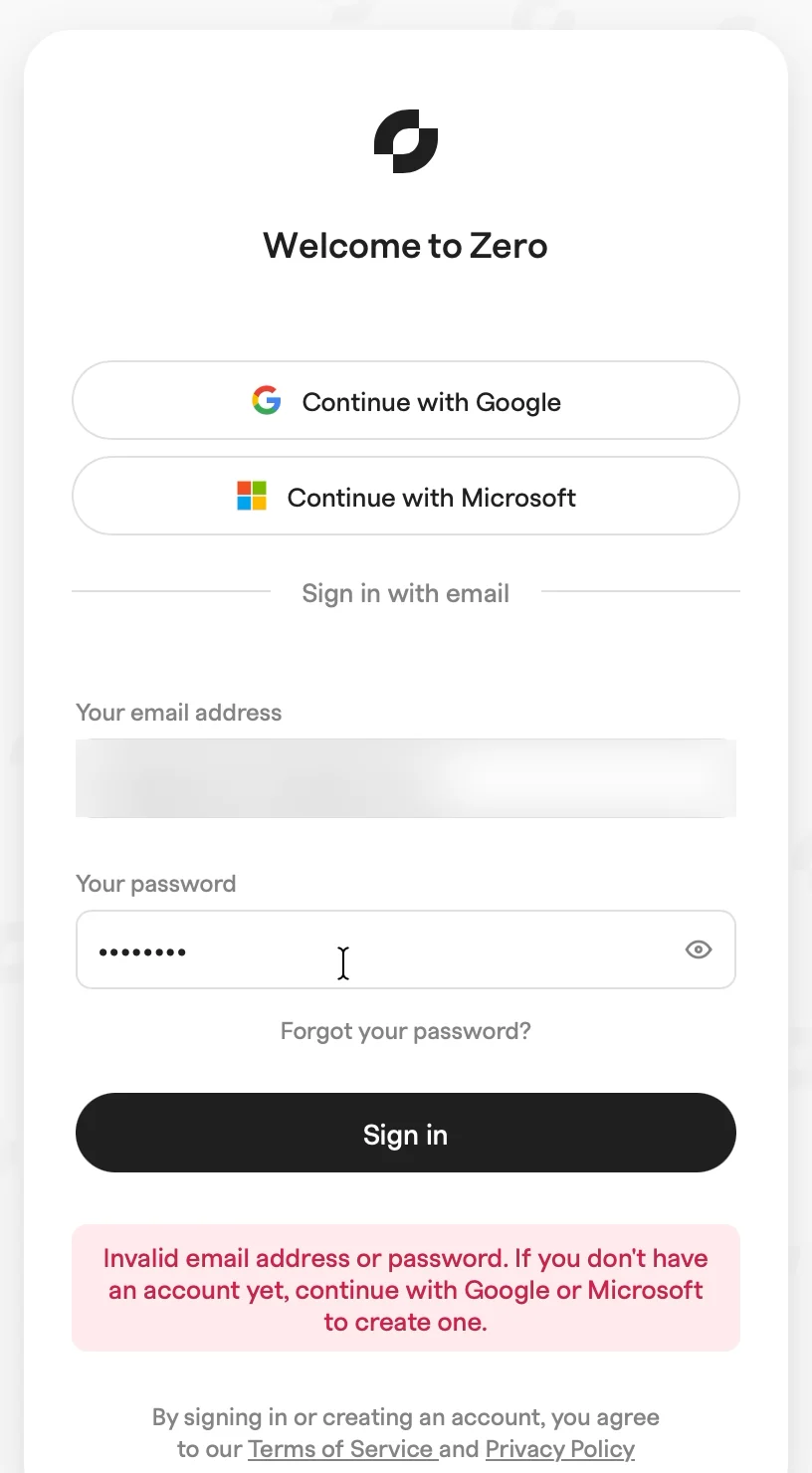
I look again. The form says "Sign in with email." It was there the whole time. I read right past it, because I'd just clicked "Start for free" and I was making an account.
And nothing on the page says that Google and Microsoft are how you make one. They create the account in one click. The email form only signs in people who already have one. I lost half a minute finding out.
❌ After "Start for free," say which way signs me up.
People who click "Start for free" think they're creating an account, so they read "Sign in" as "sign up." A label isn't enough. If Google and Microsoft create the account in one click, say so: "New here? Google or Microsoft creates your account." And if Gmail is not allowed, say it before I click, not after.
I go back to Google and pick my work account. I'm in.
3. A question I have to type before I can go on
"Create your Zero workspace." A name, a web address for the workspace, my website, my currency, my time zone.
Zero filled in most of it from my email. Nice.
The last field: "How did you hear about us?" It's an empty text box, with "e.g. Friend, LinkedIn, Google" in grey. No list to pick from.
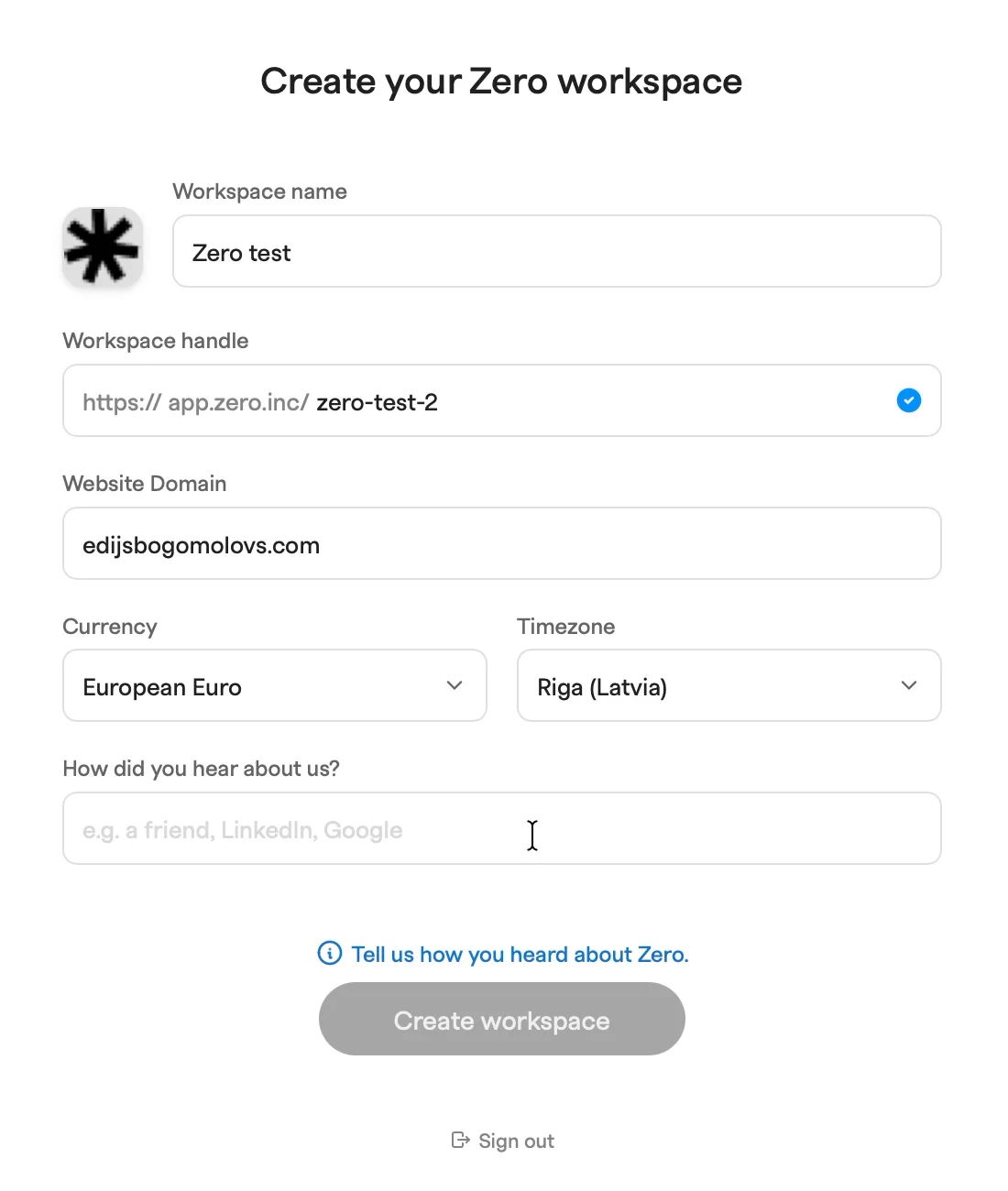
I leave it empty. The "Create workspace" button stays grey. Above it, in blue: "Tell us how you heard about Zero."
So I can't go on until I stop and type something. I type one letter: "s."
The button turns black.
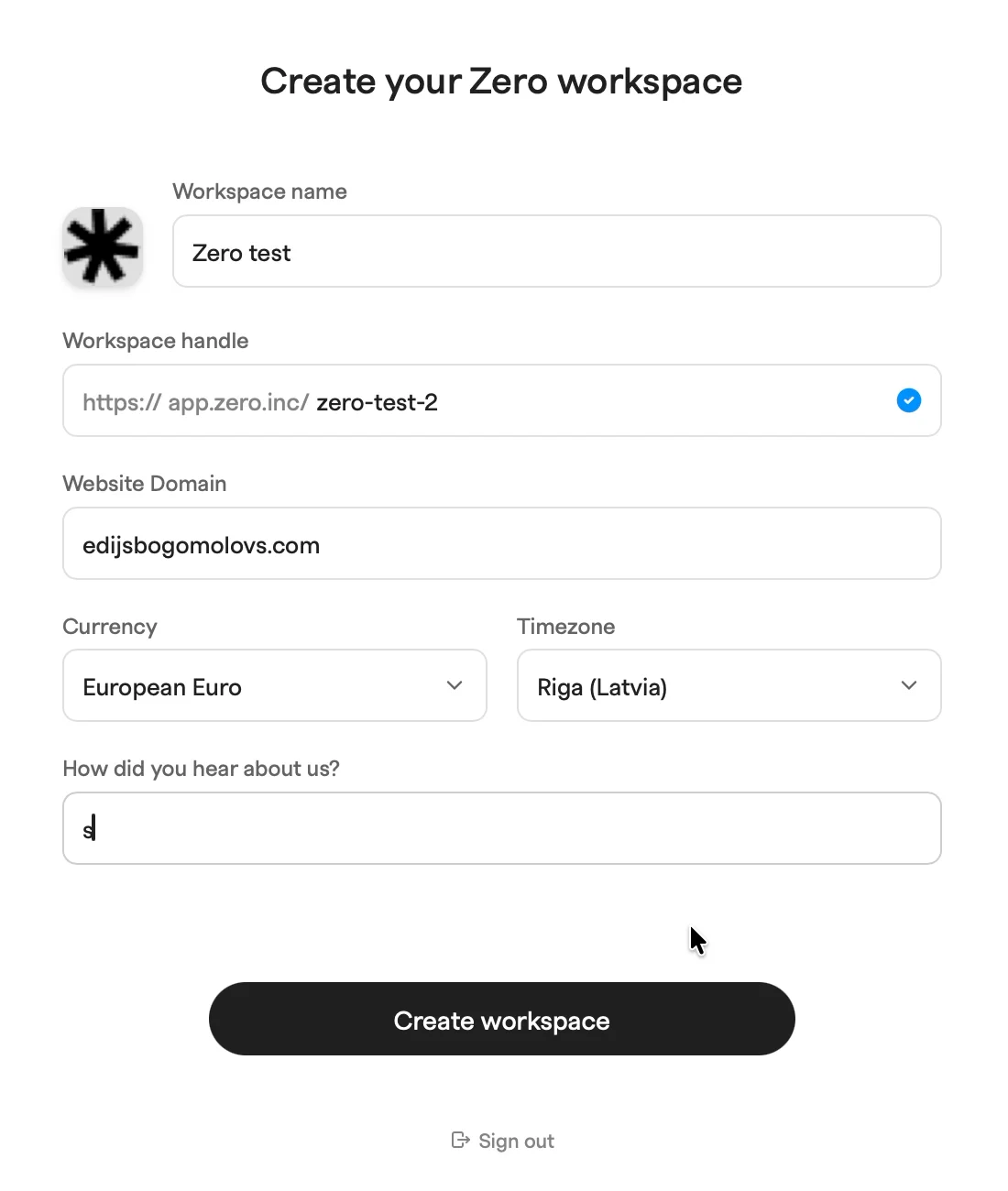
❌ Don't block sign-up with a question I have to type.
Zero wants to know which ads and posts bring people in. Fair. But this question comes before I've seen anything, I can't skip it, and it's a blank box, not a list. So I have to stop, think and type before I get to the product.
That's friction for me, and it doesn't even get Zero a true answer. It gets "s."
Somewhere, Zero's marketing team has a chart with "s" in it.
Attio asked the same question. It said "optional", and had a real Skip button.
The lesson: Ask "how did you hear about us" after people get value, when they're happy to help. Give a few options to tap, and a Skip. A required text box gets you an answer, not the truth.
4. "Did we get Zero test correct?"
"Finding company information. Looking at edijsbogomolovs.com."
Four seconds later:
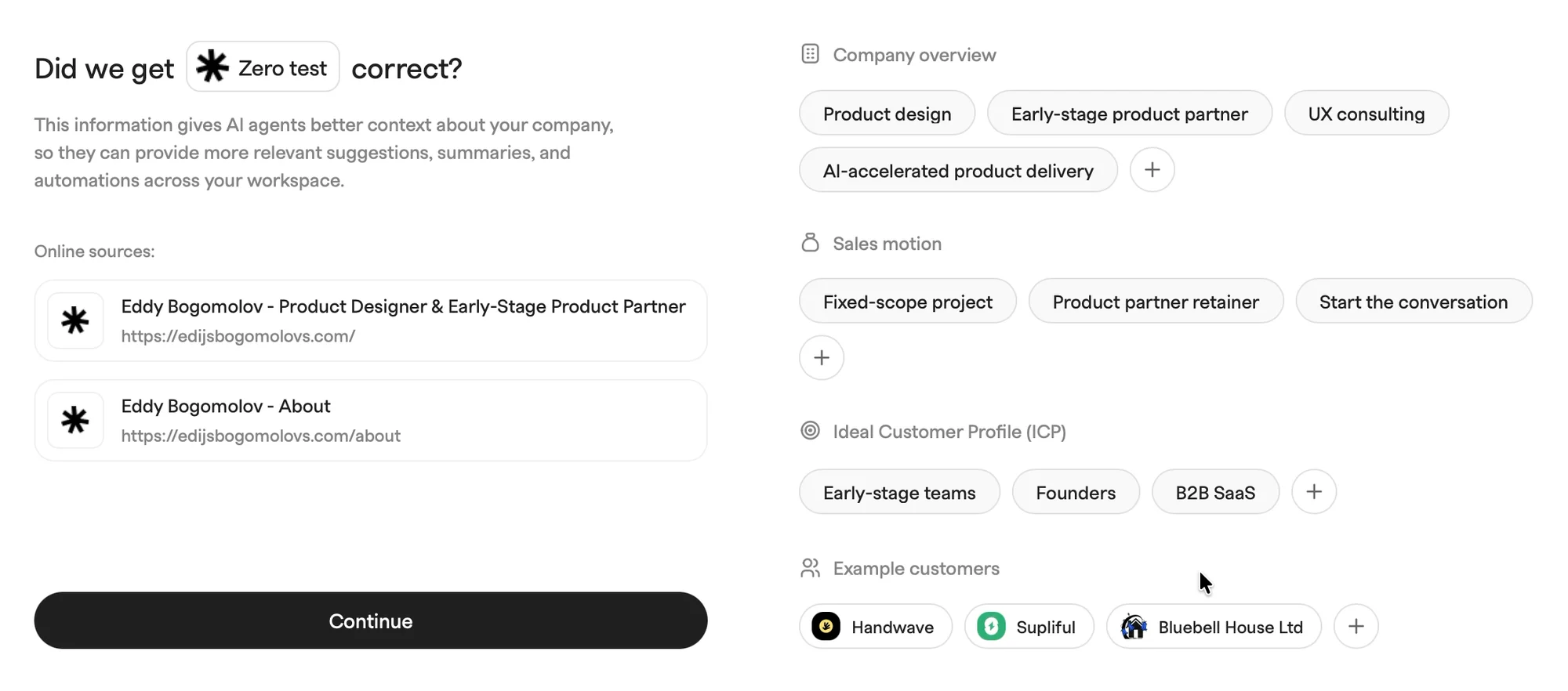
On the left, the two pages it read: my homepage and my About page.
On the right, what it found, as little tags I can remove or add to:
- What I do: product design, early-stage product partner, UX consulting.
- How I sell: fixed-scope project, product partner retainer.
- Who I sell to: early-stage teams, founders, B2B SaaS.
- Example customers: three of my real clients.
It's right. I removed one of the clients with one click.
✅ Read it first, then ask me to check.
This is the best setup step in my whole series.
In my Opal teardown, the app asked me to guess something it could measure. Here, Zero doesn't ask at all. It reads, then shows its guess and lets me fix it. Checking takes five seconds. Typing it all would have taken five minutes.
Adomate also read my site. Zero goes one step further: it shows me what it found, as tags I can edit.
The line under the title says why it matters: "This information gives AI agents better context about your company, so they can provide more relevant suggestions."
Keep that promise in mind too.
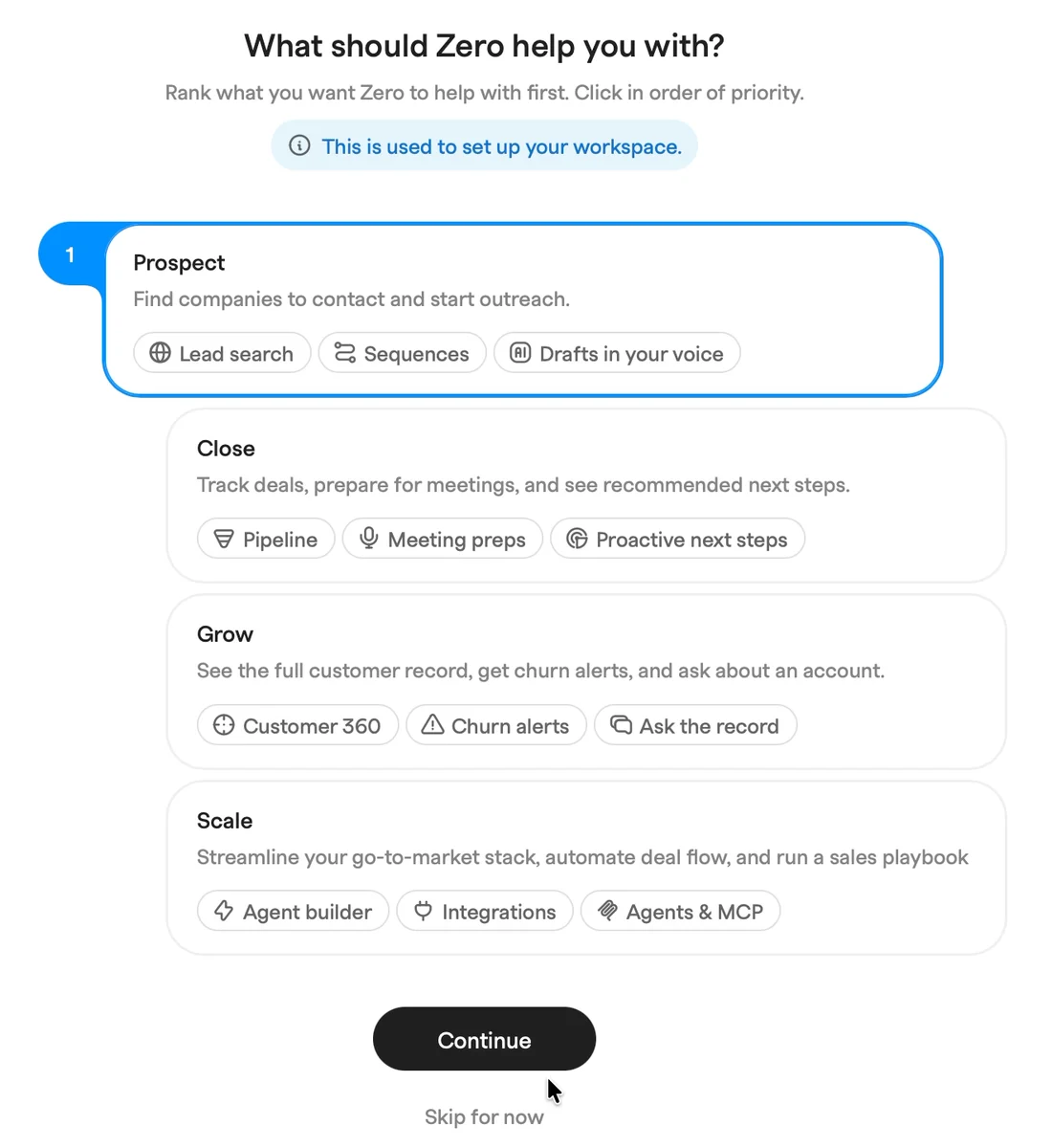
Next: "What should Zero help you with?" I rank Prospect first: "Find companies to contact and start outreach."
5. Four trips to Google
Then: "Connect your Gmail account. So Zero can find your real contacts."
Before Google opens, Zero warns me:
"One quick thing before Google opens. Keep every box checked. Zero needs all of them to read your inbox and calendar and build your contacts."
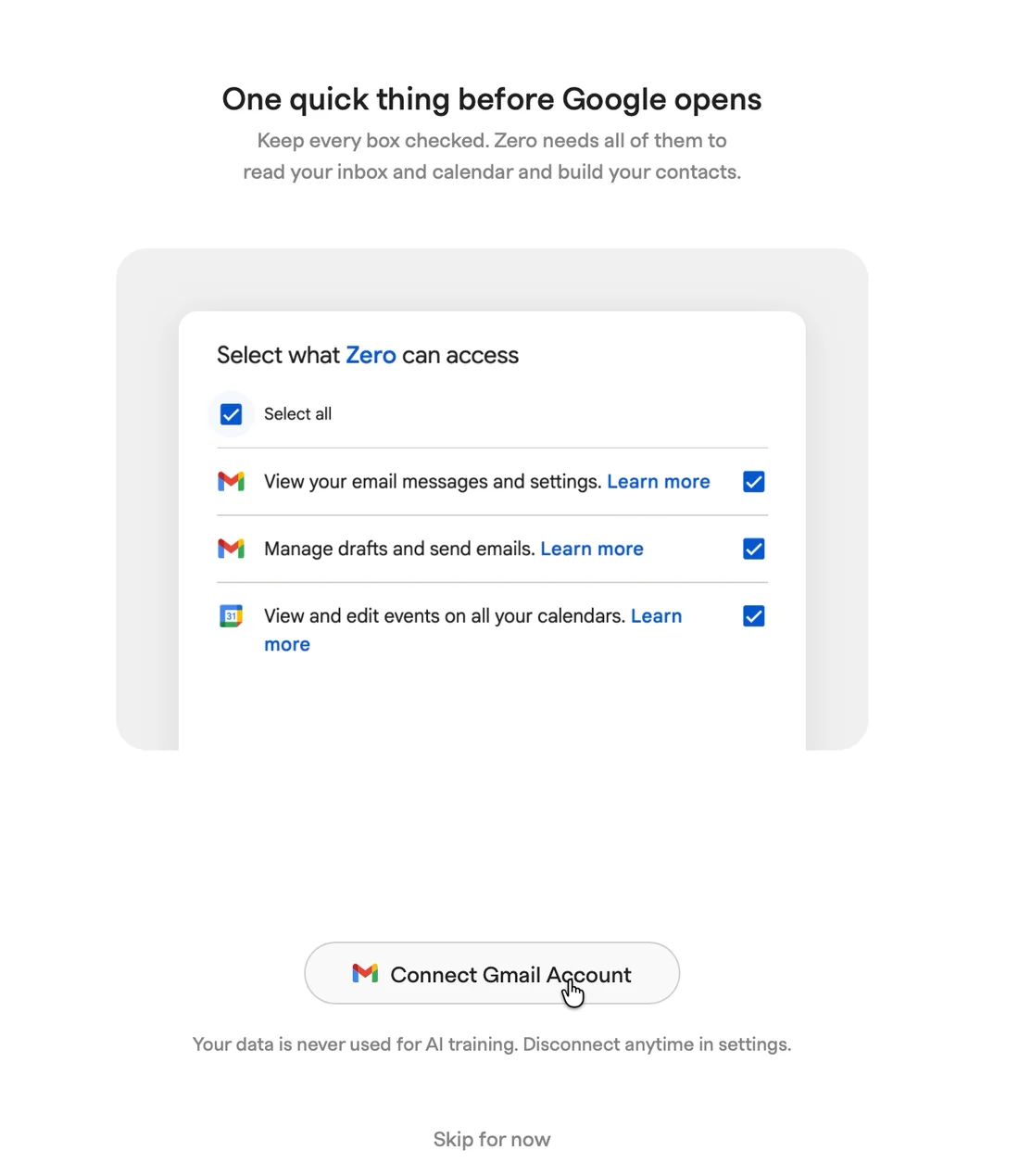
✅ Warn people before the scary screen.
It even shows a picture of Google's screen with every box ticked. I've never seen a trial do that.
Then Google opens. Every box is unticked.
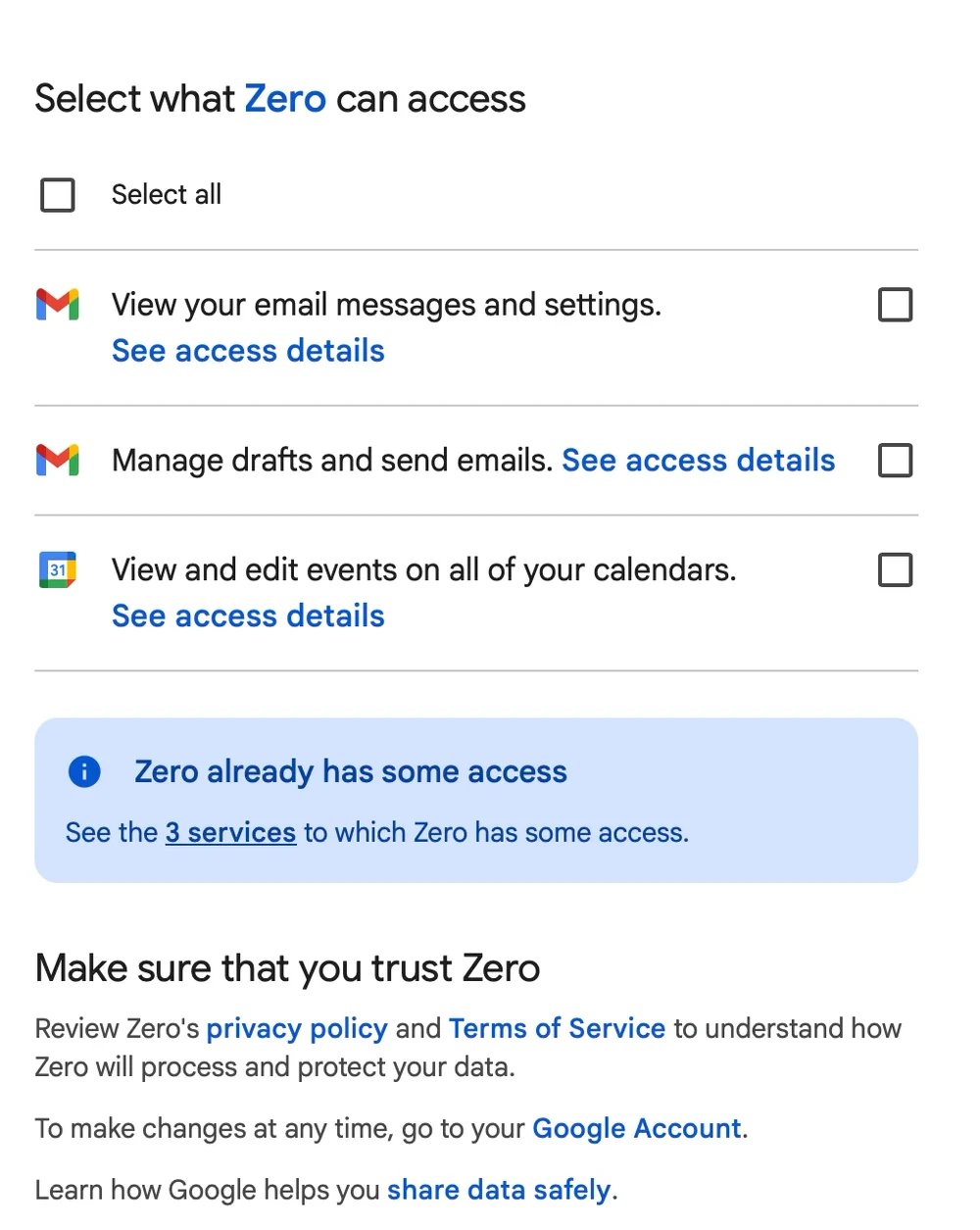
I click Continue without ticking them. I'd read the warning ten seconds ago. I still missed it.
Zero catches it:
"Some Google permissions are missing for mail and calendar. Reconnect to grant the missing permissions."
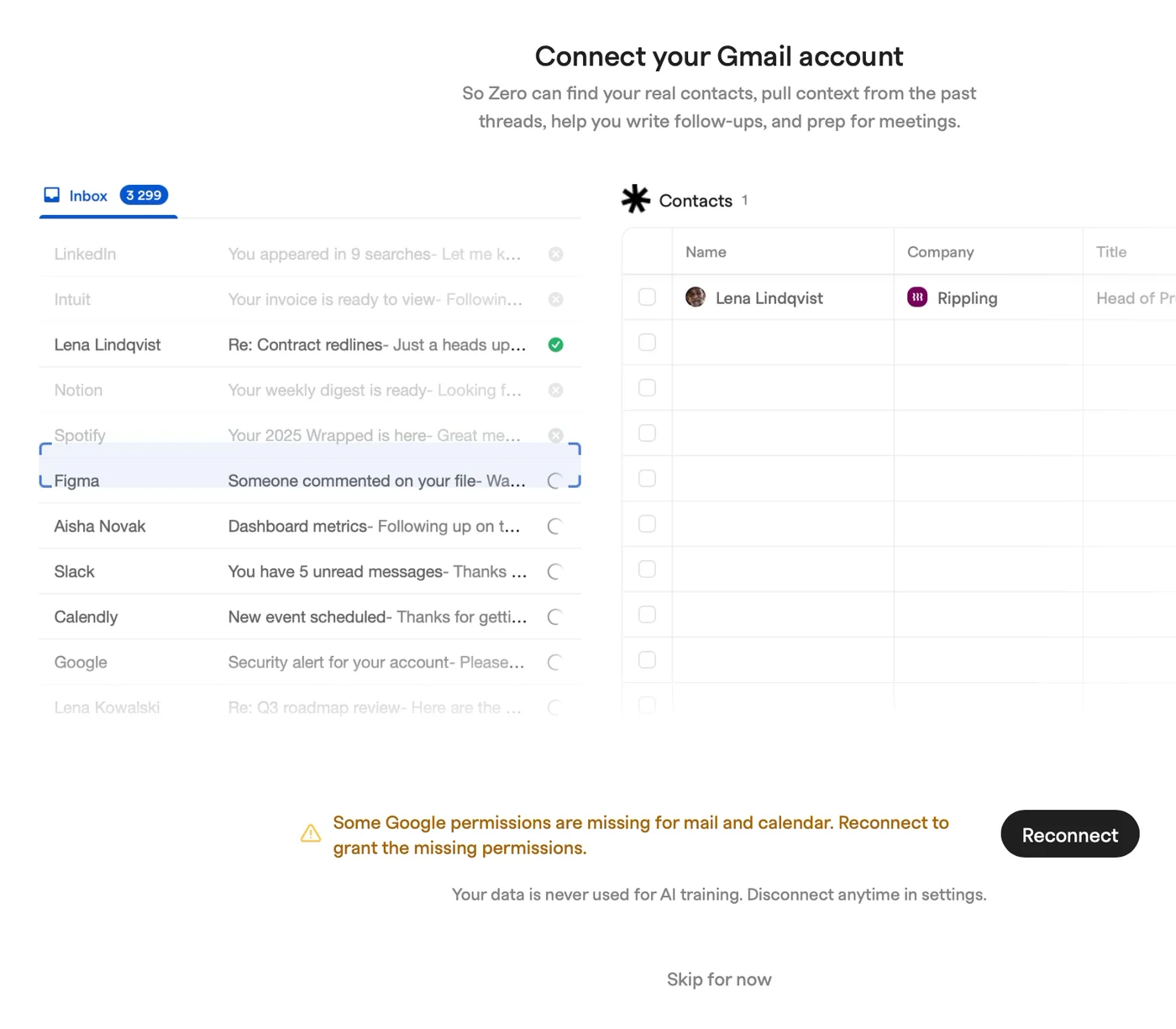
Good recovery. But it means a fourth trip to Google.
Let me count. Google with my Gmail (blocked). Google with my work account. Google to connect my inbox. Google again for the boxes. Four trips and nine Google screens in under three minutes.
❌ A warning can't tick Google's boxes for you.
Zero did everything it could on its own screen. The problem is Google's screen, where the boxes start unticked.
So the fix is fewer trips, not a better warning. I'd already signed in with Google. Zero could ask for the inbox in that same trip, with one line: "Zero builds your CRM from your inbox. Keep every box checked."
One trip. One warning, on the way to the screen it's about.
6. Found 24, skipped 290
"Filtering relevant contacts: 3 found, 146 skipped."
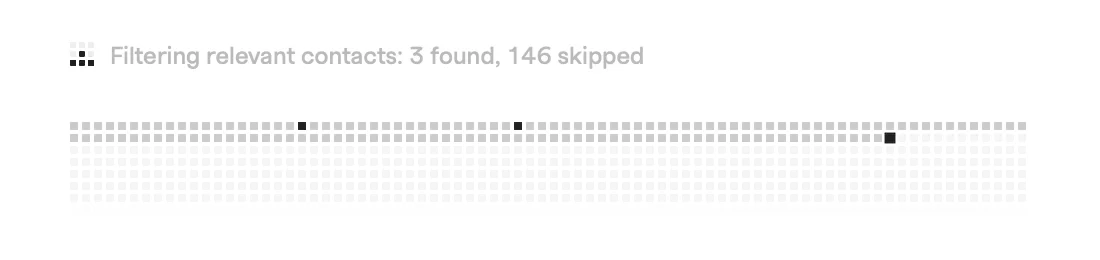
The numbers go up while I watch. 20 seconds later:
"Import contacts from Gmail. Found 24, skipped 290 contacts from your last 30 days."
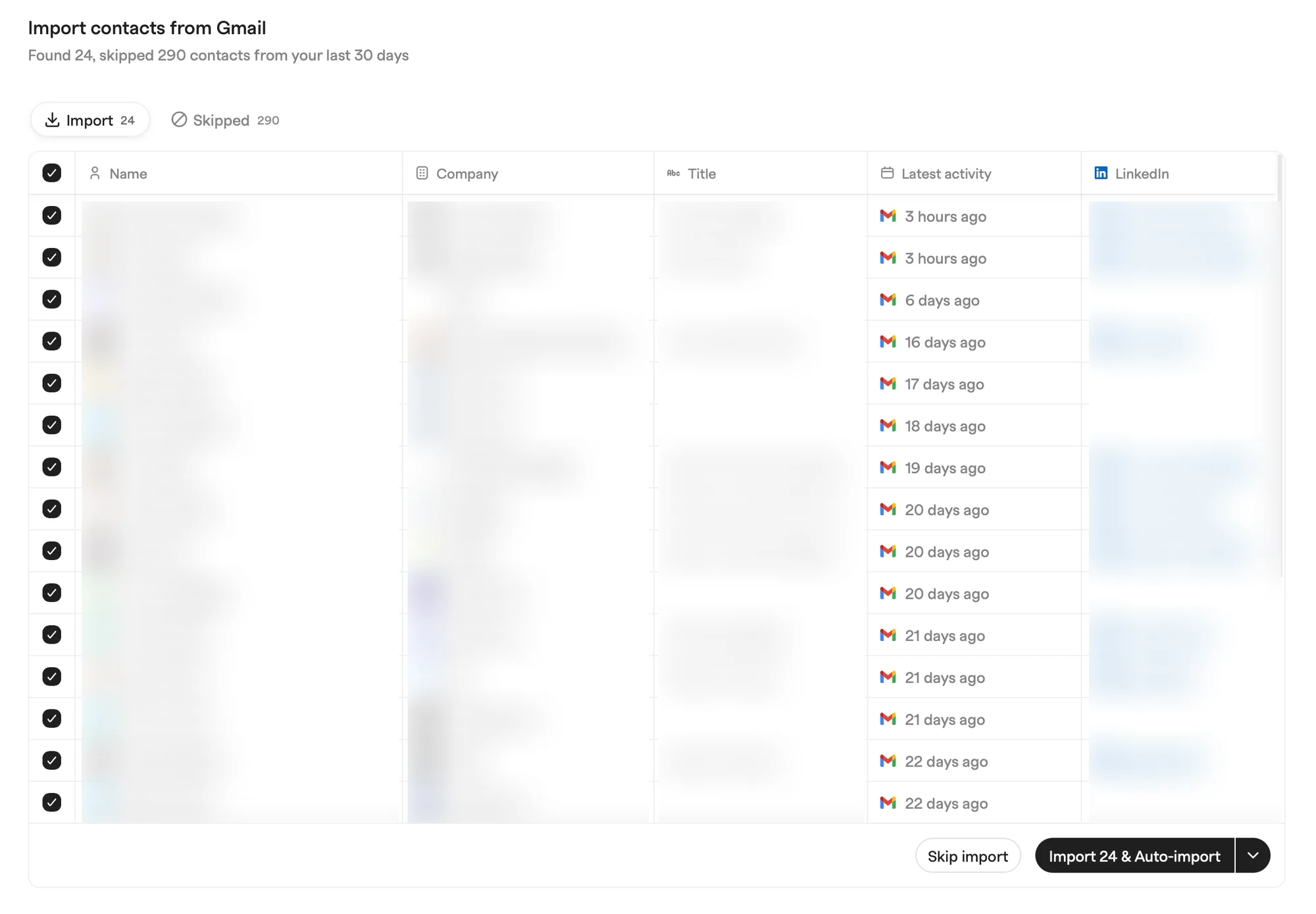
The 24 are real people I've written to. Each one has a company and the date I last wrote to them. Most have a job title and a LinkedIn link too.
And a tab called "Skipped: 290."
✅ Say what you skipped, not just what you found.
In my Attio teardown, newsletters and receipts became my "top companies." I couldn't trust any of it.
Zero shows two numbers: 24 kept, 290 skipped. The second number is why I trust the first. It tells me Zero knows most of my inbox is noise. And every row has a checkbox, so I decide who goes in.
I spent 30 seconds on this screen, just reading.
This is the moment it clicks. Three minutes after the homepage.
The lesson: When AI sorts people's data, show what it threw away, and let them check. "Found 24" is a claim. "Found 24, skipped 290" is proof.
I click "Import 24 & Auto-import."
7. A call, a checklist and credits
"Book your onboarding call. Pick a time with one of our product experts."
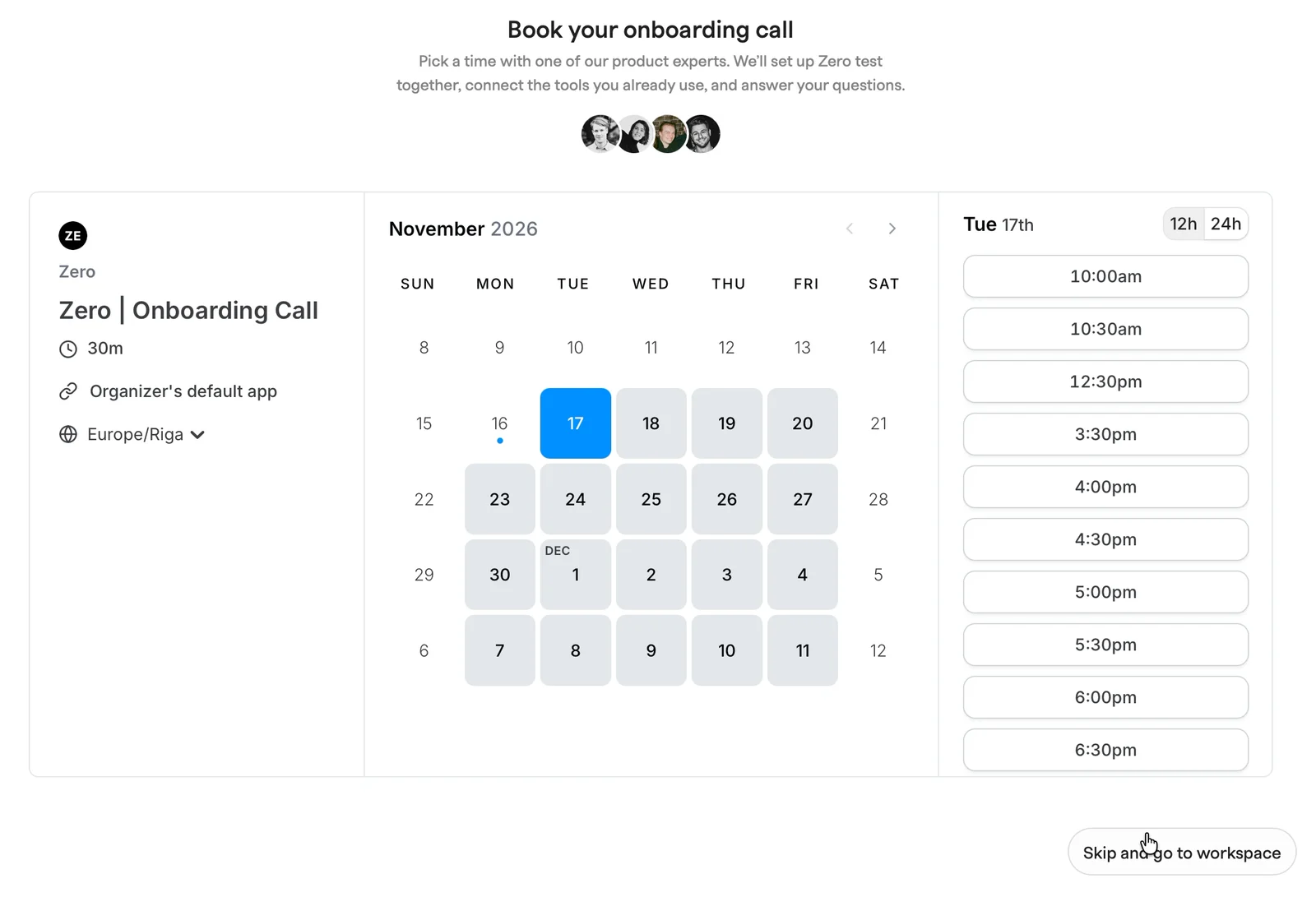
✅ Offer help, and make it easy to say no.
"Skip and go to workspace" is right there, not hidden. I skip.
"Get started. Complete these steps to set up your workspace and earn bonus credits!"
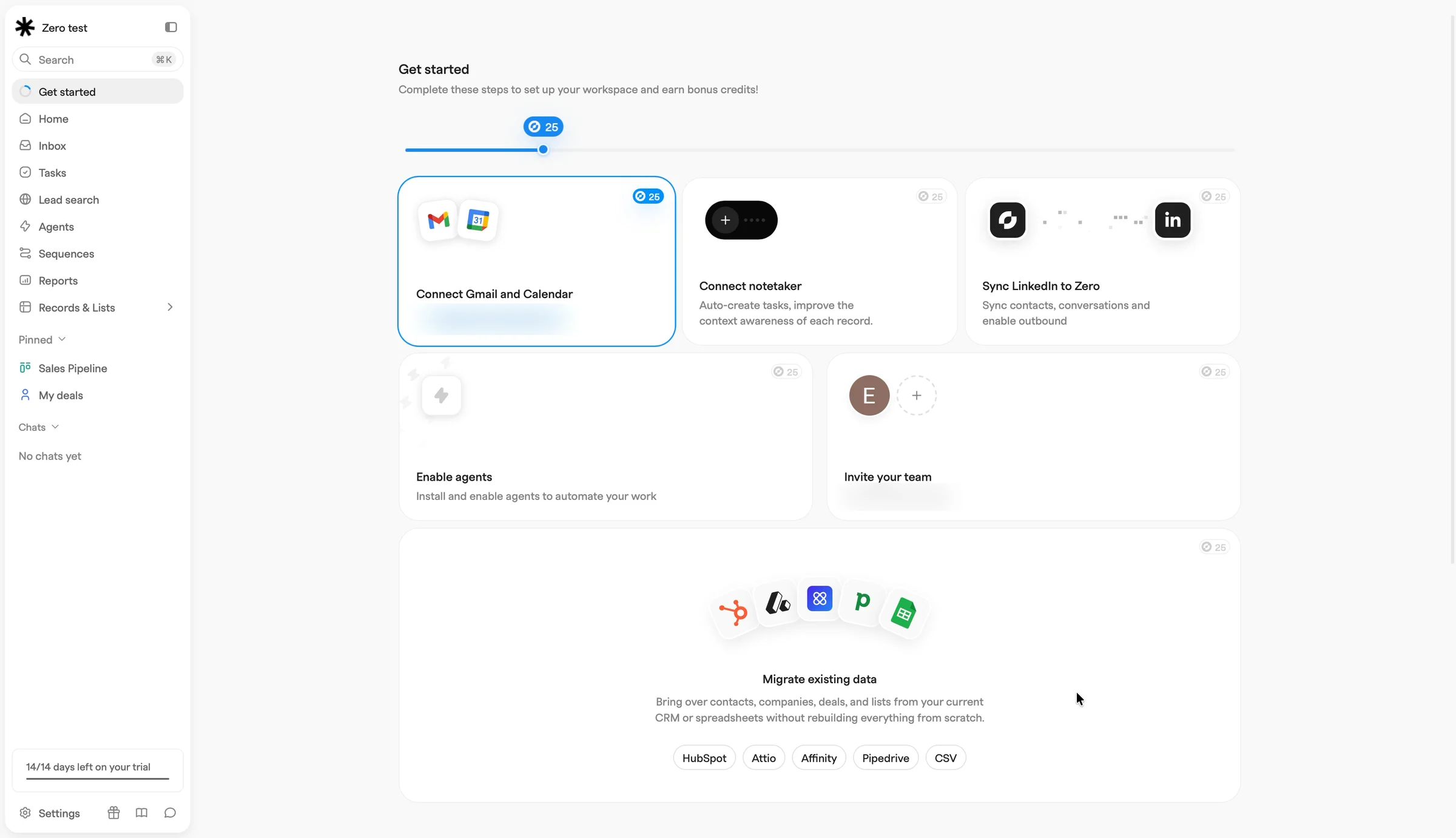
Gmail is ticked, worth 25 credits. Five more cards, 25 credits each: a note-taker, LinkedIn, agents, a teammate, and moving data from another CRM.
What are credits for? The page doesn't say.
And where are my 24 people? Not on this page.
❌ After the moment it clicks, don't change the subject.
Ten seconds ago I was reading my own contacts. Now I'm reading a to-do list about other tools.
I click Home. "Let's get to work, Edijs." The example in the chat box:
"Find fintech CTOs in Berlin and write a cold email sequence."
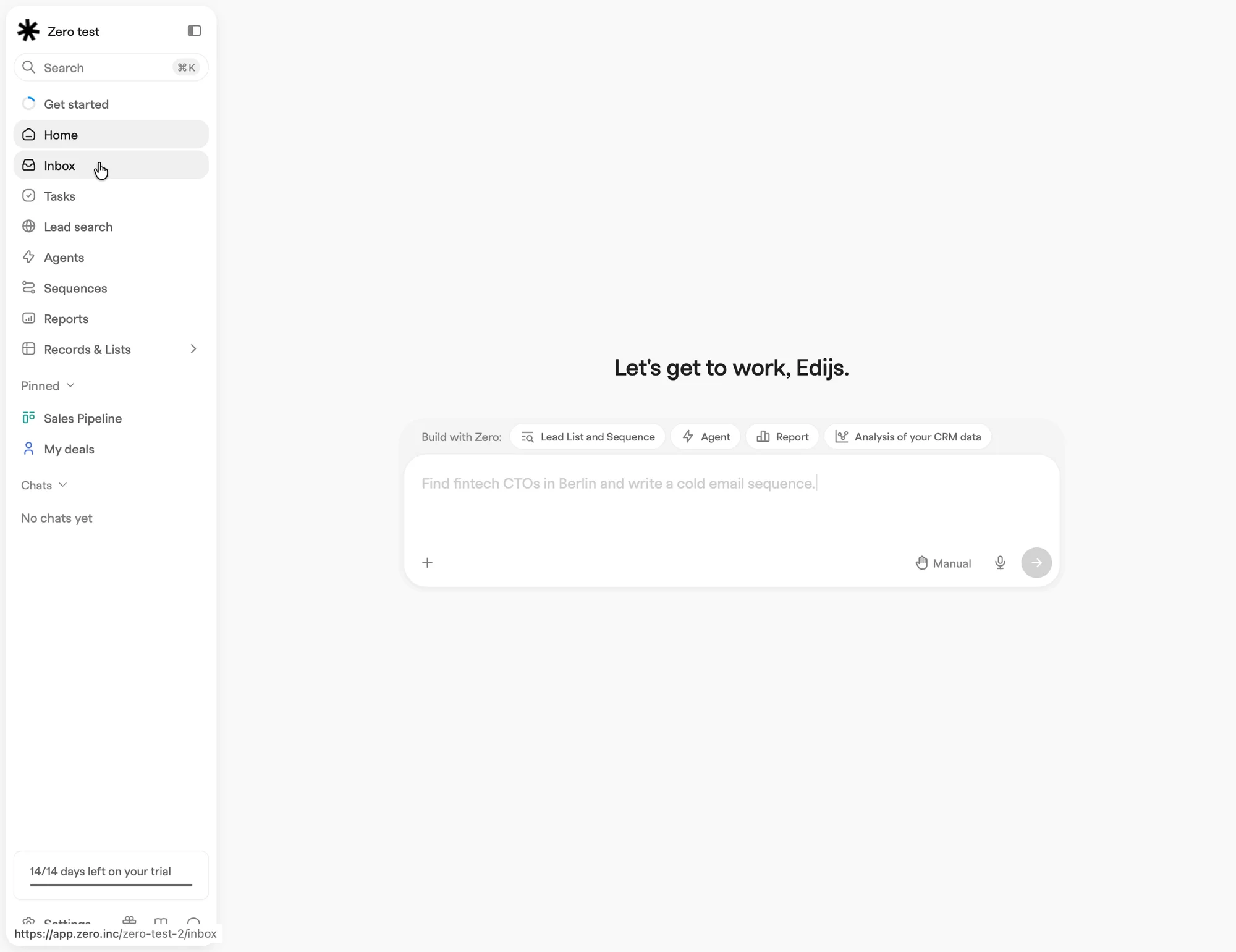
I don't sell to fintech CTOs in Berlin. Zero knows that. It wrote down who I sell to three minutes ago.
Inbox shows a few calendar invites and "Syncing 1%." Tasks: "No tasks yet."
8. An empty box, with someone else's example
I ranked Prospect first, so I open Lead search.
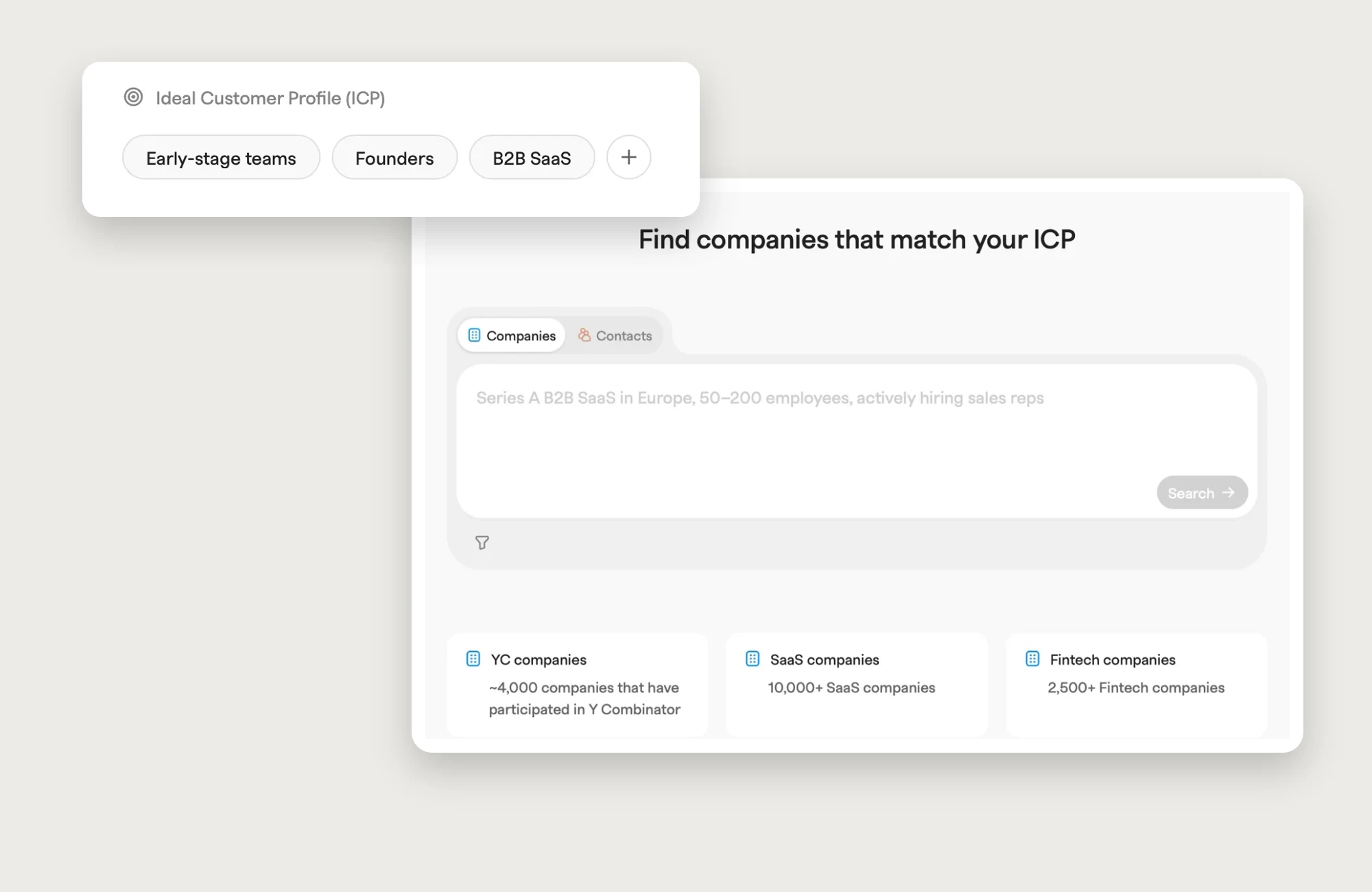
"Find companies that match your ICP."
ICP means "ideal customer profile." It's a short description of who you sell to.
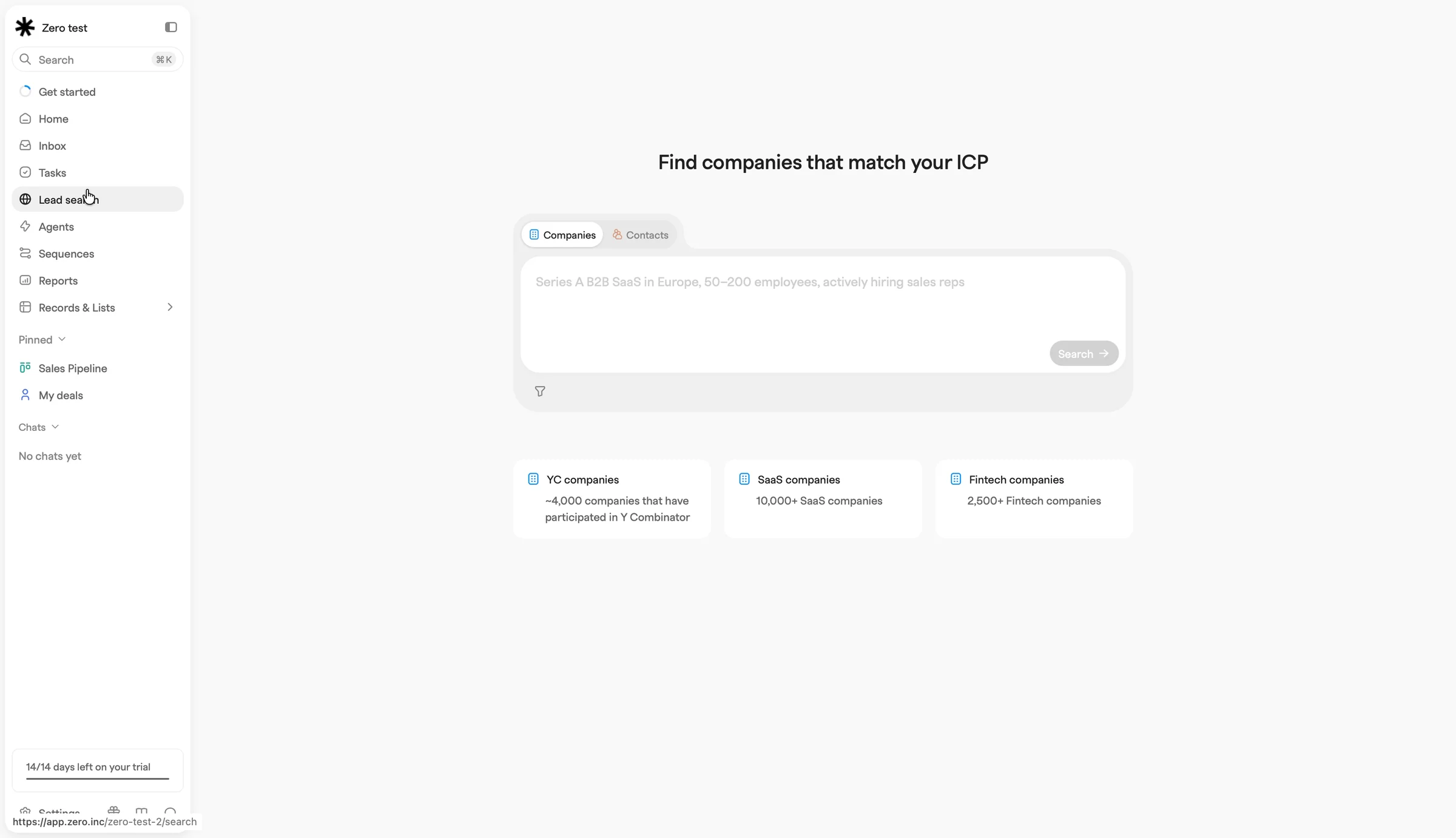
The box is empty. The grey example text inside it:
"Series A B2B SaaS in Europe, 50–200 employees, actively hiring sales reps."
That's someone's ICP. It isn't mine.
Mine is on Zero's own screen from three minutes ago: "Early-stage teams. Founders. B2B SaaS." Zero wrote it. I checked it. Zero said it gives its "AI agents better context."
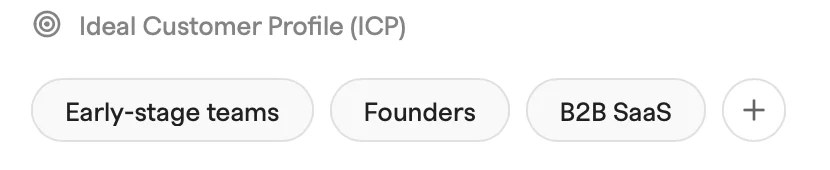

My recording ends here, 4 minutes and 34 seconds after the homepage.
9. The main problem: Zero didn't use what it knew
In four and a half minutes, Zero read my website, wrote down who I sell to, and found my 24 real contacts.
Its homepage showed an agent running the first search by itself, picking the best seven, and saying what it would do next.
In the app, nobody runs it. I get a checklist about credits, a stranger's example in the chat box, and an empty search box asking me to type what Zero already wrote down.
Zero has everything it needs to run that demo with my data. Who I sell to. Three of my real clients. My top goal: finding companies. It just doesn't use them.
Other products I've tested asked me questions, then forgot my answers. Zero didn't even need to ask. It found the answers itself, and then forgot them too.
❌ If you know who I sell to, run the first search.
The first search is already written. Run it while people set up, and open on the results.
10. What other CRMs show first
After my trial, I looked up how other CRMs start a new account. I used their public help pages and product pages, plus my own earlier trials, so a screen may look a little different today.
- Attio and folk build the CRM from your inbox. The first thing you see is people you already know. Attio's head of growth says people who connect their email are "more than twice as likely to find value within 30 days."
- Pipedrive opened on an empty pipeline in my Pipedrive teardown, with a "Try with sample data" button. Fake deals, one click away.
- HubSpot's prospecting agent can read your website too. It uses it to write what you sell. Then it still asks: "Which companies are you selling to?"
- Salesforce's prospecting agent shows results right away, but only after you type who you sell to.
- Clay, a tool for building lead lists, goes all the way. Give it your website, and it picks the search filters itself and shows companies like your customers. The whole search costs 2 credits.
- Origami, an AI sales assistant, sells exactly that moment: "10 min from entering your website to live campaigns."
So Zero is ahead of HubSpot and Salesforce on the hard part. It figured out who I sell to without asking me. Clay and Origami show the step after that: turn it into a list, on the first screen.
It wouldn't even be expensive. Zero's own pricing page says: "Searches are unlimited on paid plans."
There's one more reason it matters for Zero. For Attio, the inbox is the value: it fills the CRM with the people you already work with. But I run a small business. My inbox gave Zero 24 people. For someone like me, the first real value has to be new companies, not the ones I already know.
Two more things stood out, one good and one not:
- Showing what it skipped is rare. folk also leaves out mailing lists, but it doesn't say how many. Zero's "skipped 290" is the only count like it I found.
- Paying credits for setup is rare too. Checklists are normal in CRMs. I didn't find another one that pays you in credits for finishing it.
11. What Zero gets right
Before my fixes: four things I'd keep exactly as they are.
✅ Reads before it asks. My business, my ICP and my clients, filled in from my website, for me to check.
✅ Shows what it skipped. 24 people kept, 290 skipped, and a checkbox on every person.
✅ Warns before Google. A picture of Google's boxes before Google opens, and a clear "Reconnect" after.
✅ Help I can skip. An onboarding call, with the skip button right next to it.
Keep all four. Use what it learned.
12. How I'd redesign it
So what would I change? Not the setup.
Zero reads my site, writes my ICP, finds my real contacts and skips the noise. Its homepage already shows the agent running a search. The parts are there.
So I'd change the two screens after the import: the first screen in the app, and Lead search.
The first screen: stay on my people
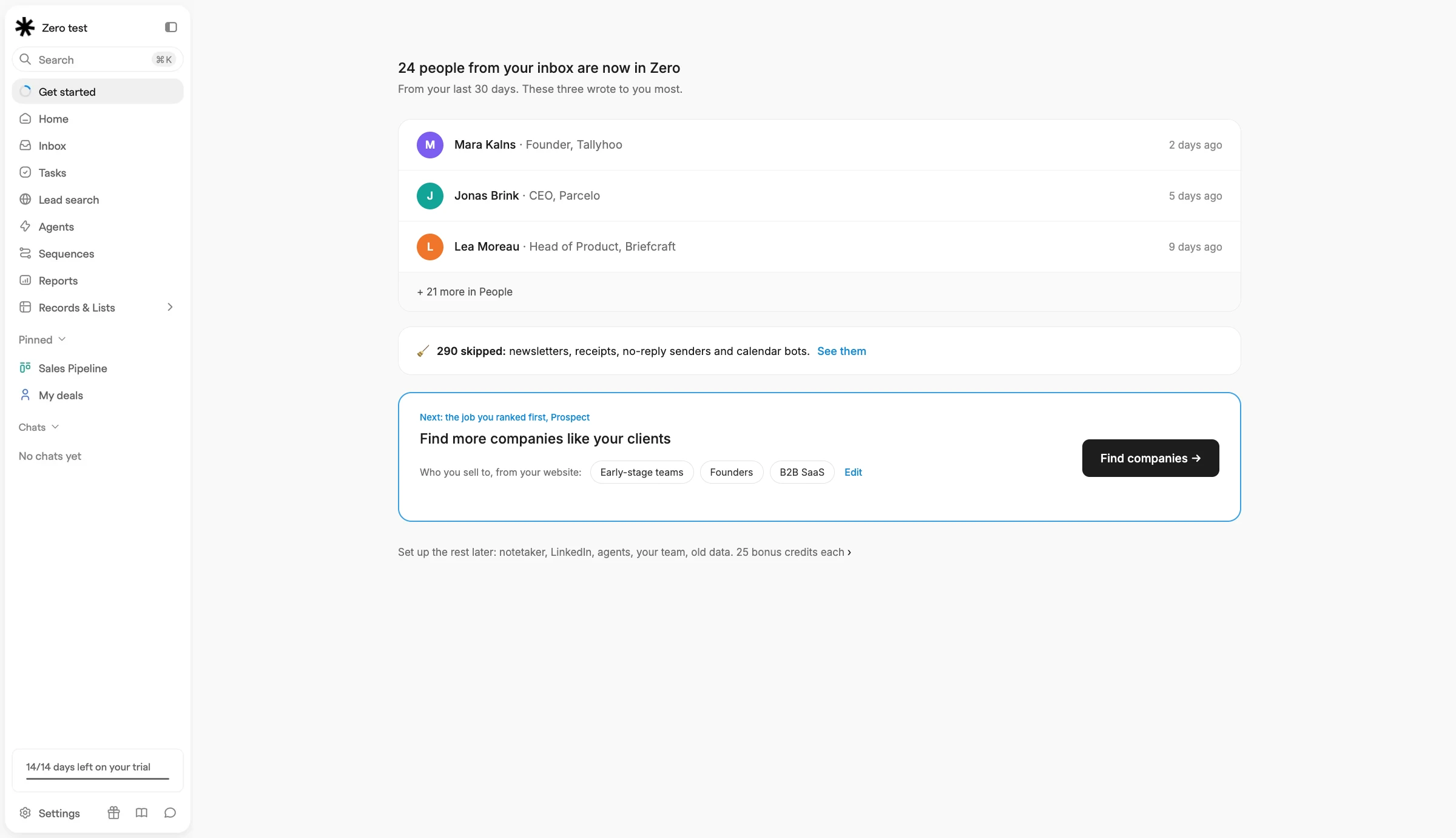
"24 people from your inbox are now in Zero." The three I write to most, with "+21 more in People." Under them: "290 skipped: newsletters, receipts, no-reply senders and calendar bots. See them."
Why: The import is the best moment in the trial. The first screen in the app should keep me there.
Under them, the next step in its own card: "Find more companies like your clients." It shows the ICP from my website, with "Edit," and the button sits right inside the card. The credits checklist folds into one line at the bottom.
Why: It points to the job I ranked first, right next to what it will use. The credits can wait.
Lead search: open on the results
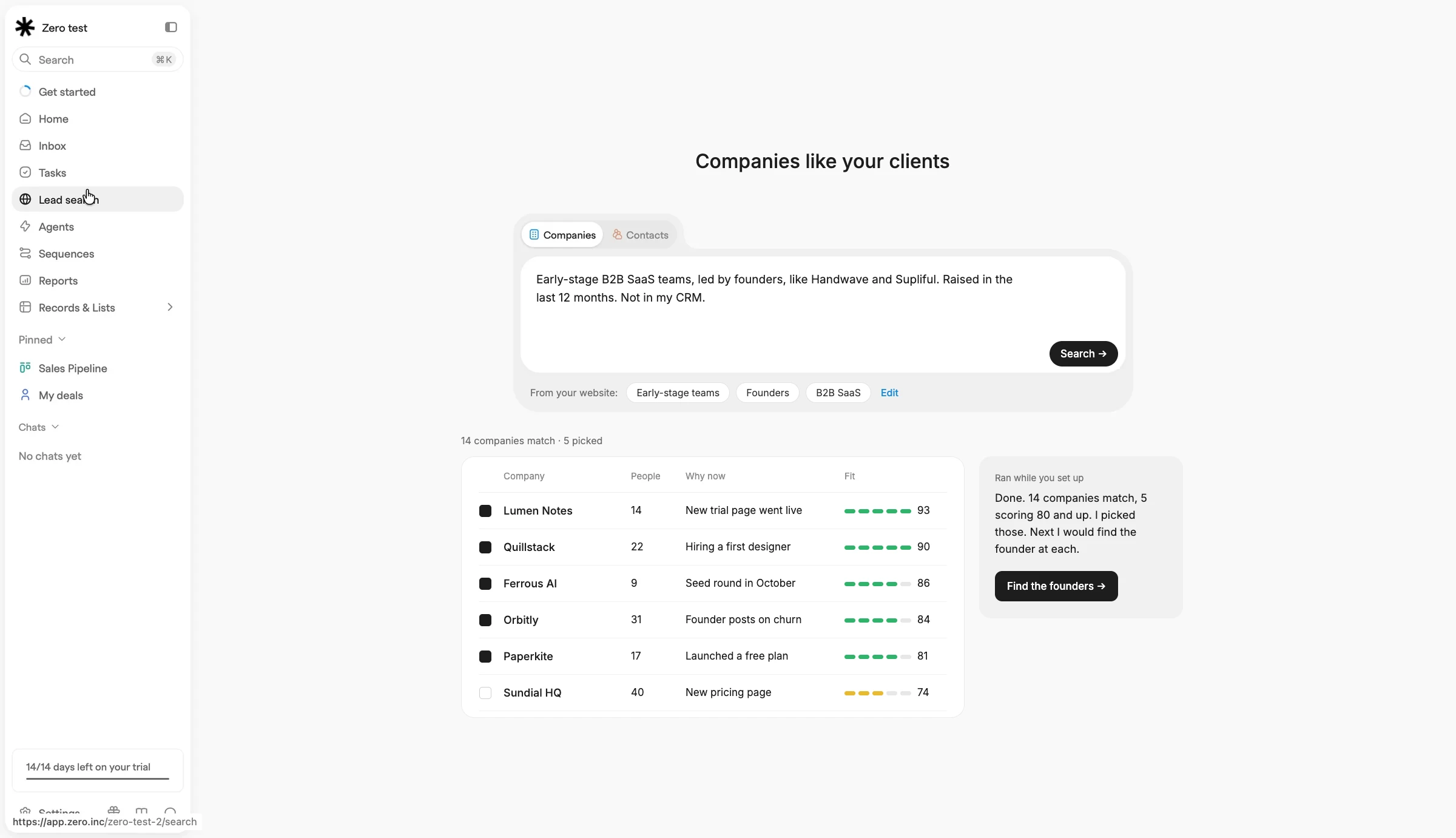
"Companies like your clients." The search box is already filled in with my ICP: "Early-stage B2B SaaS teams, led by founders, like Handwave and Supliful." Under it, the tags it came from, and "Edit."
Why: I shouldn't have to type what Zero already wrote down.
Next to the results, the same agent note as the homepage: "Ran while you set up. Done. 14 companies match, 5 scoring 80 and up. I picked those." The button sits right under it: "Find the founders."
Why: It's the homepage demo, with my data. The best proof that Zero can find my next customer is a list of them, waiting for me.
And two small fixes that need no design:
- "New here? Google or Microsoft creates your account" on the welcome screen.
- "How did you hear about us?" asked after the first search, with options to tap and a Skip.

13. Three tests I'd try first
If I worked on getting more Zero trials to turn into paying customers, I'd start with these three.
Test 1: Run the first search during setup
Problem: Zero writes my ICP during setup. Lead search then opens empty, with someone else's example.
Change: Start a search with the ICP while the inbox imports. Open Lead search on the results, with the ICP in the box and an Edit link.
What I think will happen: More people will run a second search, and more will add contacts from it on day one.
What to count: How many people open Lead search in the first session, how many save a company from it, and how many start a sequence in the first week.
Test 2: Keep the import on screen
Problem: After the best screen, "Found 24, skipped 290", the app opens on a checklist about credits and other tools.
Change: End setup on the people it imported, what it skipped, and one button to the job I ranked first.
What I think will happen: More people will open a contact or a company in the first session, and fewer will leave from the checklist.
What to count: How many people open a record in the first ten minutes, how many come back the next day, and how many pay after the trial.
Test 3: One trip to Google
Problem: Signing in and connecting the inbox are two separate trips to Google. On the second one, the boxes start unticked, and people like me miss them.
Change: Ask for the inbox in the same trip as sign-in, with the "keep every box checked" line on the way there.
What I think will happen: More people will connect their inbox the first time, and fewer will need "Reconnect."
What to count: How many people connect their inbox, how many see the missing-permissions warning, and how long it takes from sign-up to the import screen.
Before any of these, I'd make "How did you hear about us?" optional, with a few options to tap. That's not a test. It's just getting honest answers.
These are ideas to test, not promises. Some of them might not work.
14. It knew who I sell to
Zero gets a lot right.
The homepage shows the product doing the job.
It read my website and wrote down my business in four seconds.
It warned me about Google's screen, and caught it when I got it wrong anyway.
And it found the 24 people who matter in my inbox, and told me about the 290 it skipped. That's the best screen I've seen in any CRM trial.
But then it changed the subject. A checklist about credits. A chat box asking about fintech CTOs in Berlin. And a search box that says "match your ICP", with someone else's.
What Zero gets right
- Reading before asking: My business, my ICP and my clients, filled in from my website, for me to check.
- Showing the skip list: "Found 24, skipped 290", with a checkbox on every person.
- The Google warning: A picture of the boxes before Google opens, and a clear "Reconnect" after.
- Fast to value: My own contacts in Zero three minutes after the homepage.
What I'd improve
- The first search: Run it with my ICP during setup. Open Lead search on the results.
- After the import: My people and the next step, not a checklist about credits.
- The examples: Use my ICP in the chat box and the search box, not a stranger's.
- Google: One trip, not four.
- The welcome screen: Say Google and Microsoft create the account, and the email form only signs in.
- "How did you hear about us?": Later, with options to tap and a Skip.
The bigger lesson
AI products can now do something that used to take a whole onboarding call: figure out who you are and who you sell to, on their own.
Zero does it in four seconds. Few products I've tested even try.
And it's becoming normal. HubSpot's agent reads your website. Clay turns it into a list. Soon, knowing who you sell to won't stand out. Using it on the first screen will.
But knowing is only half of it. Every screen after that moment should feel like it knows too: the examples, the empty boxes, the first search.
If your product learns something about people during setup, ask three questions:
Where does that answer show up again, and how soon?
Is there any example text left on screen that belongs to someone else?
And when your AI sorts people's data, does it show what it threw away?
For Zero, the fix could be as simple as running the first search while the inbox imports.
Same website. Same inbox. Same ICP.
But this time, the first screen would show me my next customers.
What does your product learn about people during setup? Where does it show up again? I'd love to hear how your product handles it.
I break down real sign-ups and free trials to show where they lose potential paying customers and how to improve the experience.
Want me to review your trial? DM me "teardown" on LinkedIn.
Eddy
If it looks like a chat, it should answer like one
Ada by Ads On Tap, Nov 23, 2026